
Operations
How to Block Visitors From Specific Countries on Shopify
By Patrick · Founder, Virtual Freelance Solutions · 10+ years in eCommerce customer support
Introduction
Whether you are dealing with a sudden influx of spam, restricted distribution licenses, or high chargeback rates, knowing how to block visitors from specific countries on Shopify is an essential skill for modern store owners.
In this comprehensive guide, we will explore the exact steps, tools, and strategies you can use to manage international traffic. We will cover everything from simple app integrations to advanced server-level rules, ensuring you have the right solution for your unique business needs.
Why Would You Want to Block International Traffic?
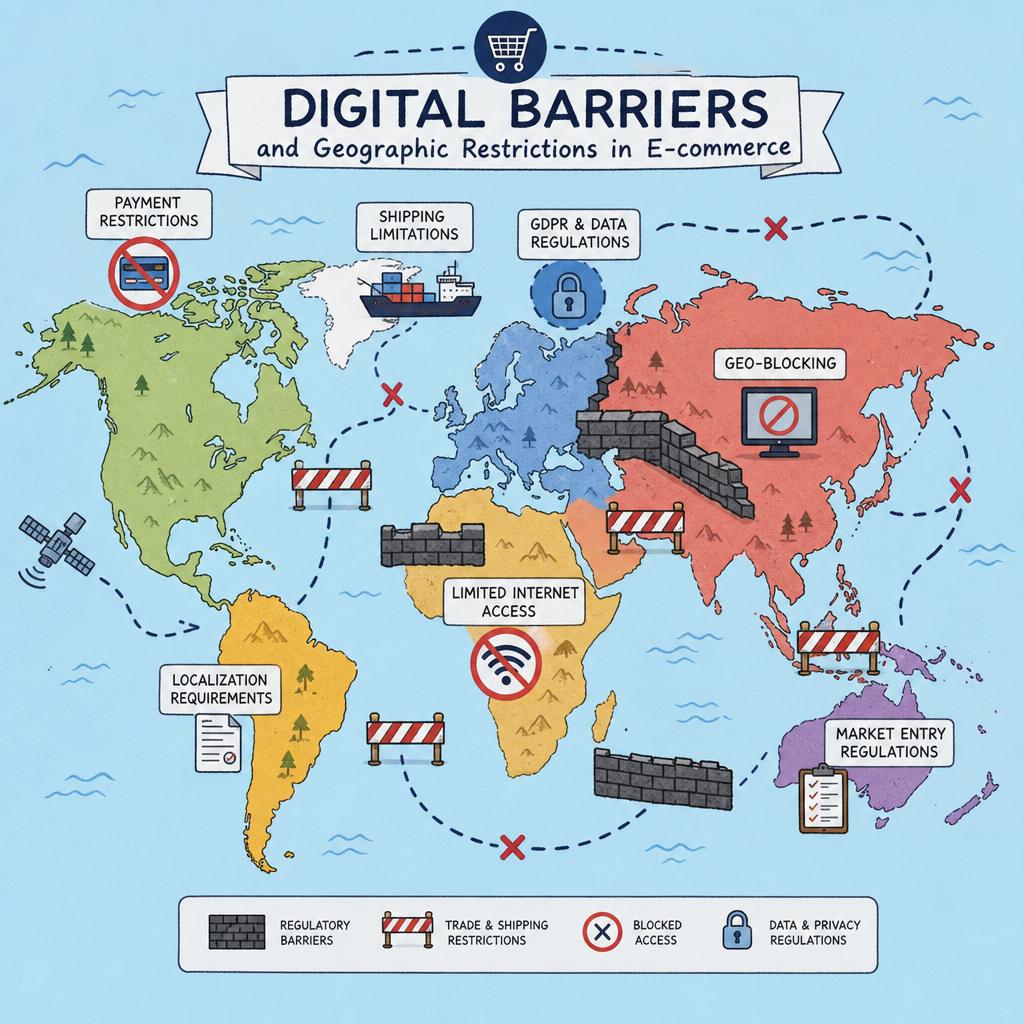
Before diving into the technical "how-to," it is important to understand the "why." E-commerce entrepreneurs choose to restrict access to their stores for a variety of legitimate reasons:
- Fraud Prevention: E-commerce fraud is a multi-billion dollar problem. Store owners often need to prevent fraud orders by IP address when they notice a pattern of stolen credit cards or chargebacks originating from specific locations.
- Targeted Security Risks: You may want to focus on reducing high-risk traffic from specific regions that are known for generating malicious activity, hacking attempts, or spam submissions on your contact forms.
- Bot Management: Malicious bots scrape pricing, steal content, and slow down your site. Effectively filtering bot traffic by geographic location can preserve your server bandwidth and maintain fast loading speeds for your actual customers.
- Licensing and Distribution Limits: If you sell branded merchandise (like Marvel or Disney products), your vendor contract may legally restrict you from selling outside of North America or Europe.
- Shipping Constraints: If you absolutely cannot fulfill orders to certain parts of the world due to customs issues or high carrier costs, blocking those regions prevents customer frustration.
Understanding Your Options: Restrict, Redirect, or Block?
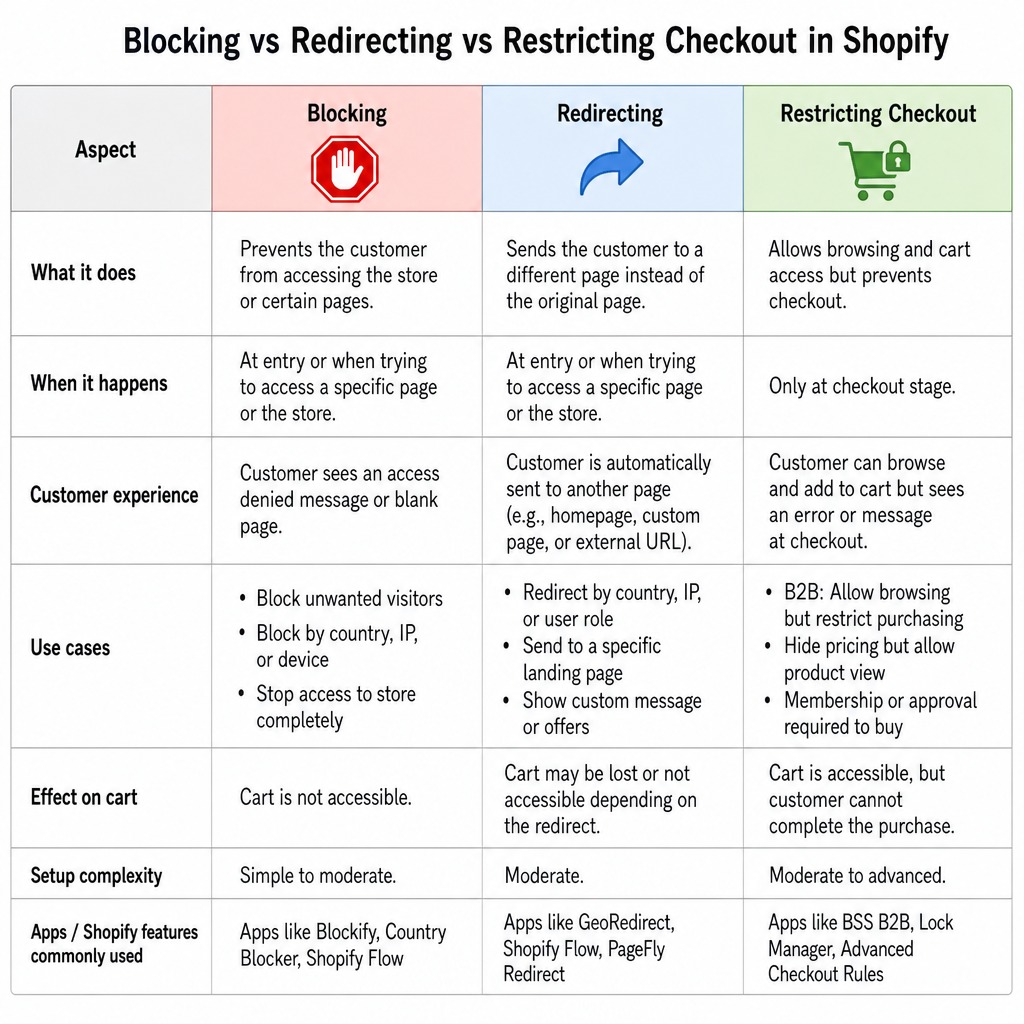
When dealing with unwanted international traffic, a hard block isn't your only option. Depending on your goals, you might want to consider alternative approaches.
1. Restricting Checkout vs. Blocking the Site
If your main goal is simply to prevent people in certain countries from buying your products, you might not need to block them from viewing the site. Instead, you need to know how to restrict shipping zones in Shopify. By going to your Shopify Settings > Shipping and Delivery, you can easily delete shipping zones for countries you don't serve. Visitors from those countries can still read your blog and view products, but they will receive an error at checkout stating that shipping is not available to their location.
2. Redirecting Based on Location
What if you have multiple regional storefronts? In this scenario, you should look into Shopify geolocation redirect vs blocking. Instead of locking users out, you are redirecting visitors based on IP location to the correct version of your site (e.g., sending a UK visitor from your .com site to your .co.uk site).
You can accomplish this seamlessly using Shopify Markets internationalization features. Shopify Markets allows you to tailor the buying experience—including currency, language, and localized domains—without aggressively blocking anyone.
3. The Hard Block (Geofencing)
If you are dealing with malicious traffic, legal compliance, or absolute exclusivity, a hard block is necessary. This creates a geofencing Shopify store environment where users from specified IPs simply see an "Access Denied" or custom error page.
Method 1: Using Dedicated Shopify Apps (The Easiest Approach)
Let's dive into the practical methods for setting up these hard blocks.
For the vast majority of merchants learning how to block visitors from specific countries shopify, using a dedicated app from the Shopify App Store is the most efficient, reliable, and user-friendly method.
The Best Shopify Apps for Country Blocking
There are several highly rated applications designed specifically for traffic management. Some of the best Shopify apps for country blocking include:
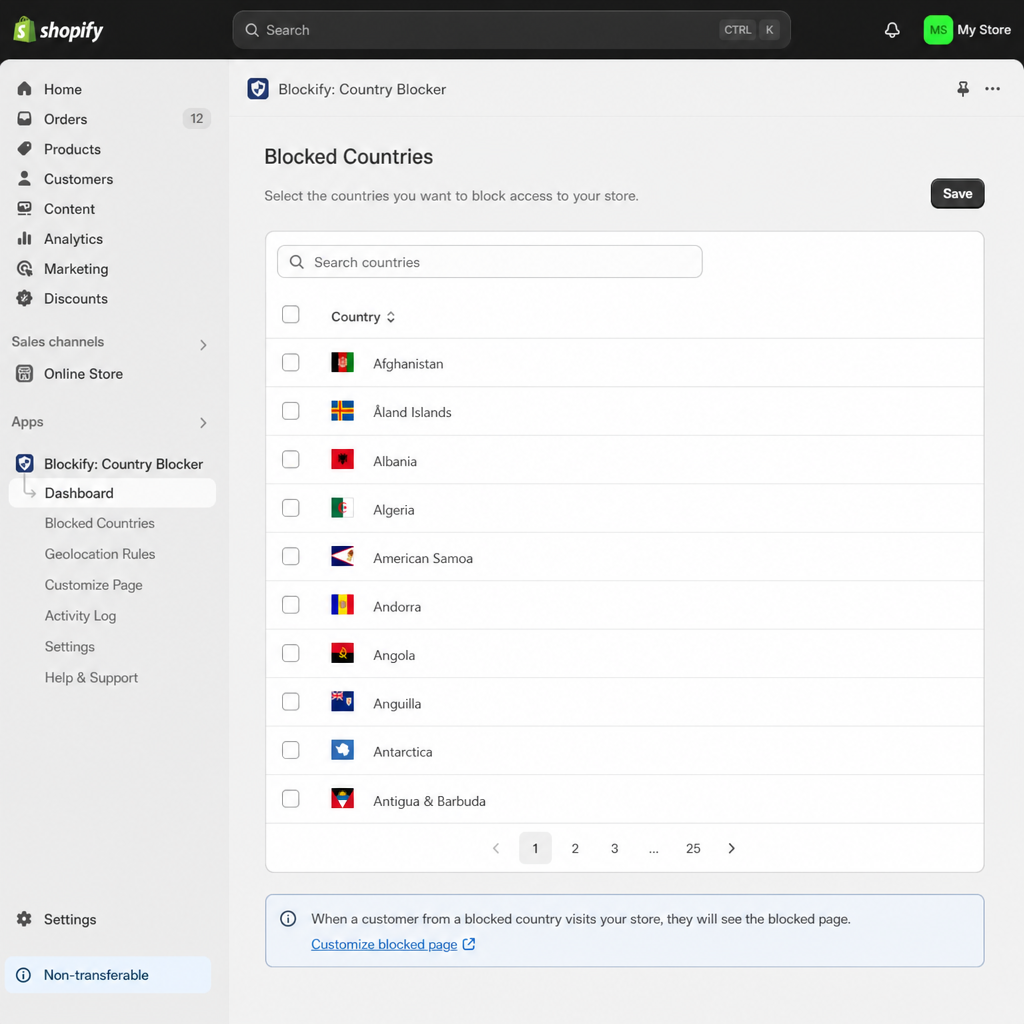
- Blocky: IP & Country Blocker: This is a fan favorite. It allows you to block specific IP addresses, entire countries, or specific bots. It also allows you to customize the message blocked visitors see.
- Traffic Guard: Excellent for creating customized rules and redirecting traffic based on complex geographic parameters.
- EasyLocation: Focuses heavily on IP redirects and blocking, ensuring users are sent to the right store or blocked entirely based on their location.
How to Set Up an IP Blocking App
While the interface varies slightly from app to app, the general process is highly standardized:
- Install the App: Navigate to the Shopify App Store, search for your chosen app (like Blocky), and click "Add app."
- Grant Permissions: Allow the app to view your store's analytics and modify your theme so it can execute the blocking scripts.
- Select Target Countries: Inside the app dashboard, navigate to the "Country Blocking" or "Blacklist" tab. Check the boxes next to the countries you wish to exclude.
- Configure Advanced Settings: High-quality apps will give you the option of detecting VPN and proxy users. This is a crucial feature because malicious users often use Virtual Private Networks to spoof their location and bypass basic country blocks.
- Customize the Blocked Page: Instead of a broken page, customize the HTML to politely inform the user: "Sorry, we currently do not offer services in your region."
- Test the Setup: Use a free VPN on your own computer to simulate a visit from the blocked country to ensure the app is working correctly.
Method 2: Custom Code Solutions (For Advanced Users)
Many budget-conscious store owners ask: "can I block specific countries without an app?" The short answer is yes, but it requires technical knowledge and comes with a few caveats. Because Shopify is a hosted platform, you do not have access to the backend .htaccess files or server-level configurations like you would on an open-source platform like WooCommerce. Therefore, to block users natively, you have to rely on frontend coding by customizing liquid code for regional access.
How It Works
Shopify's native Liquid language doesn't have a built-in variable to detect a user's country directly upon page load without relying on Shopify's internal geolocation data (which is usually reserved for the checkout or Shopify Markets).
To do this manually, you have to inject JavaScript into your theme.liquid file. The script calls a free or paid IP geolocation API (like IPinfo or ipapi), checks the visitor's country code, and forces a redirect if the country matches your blacklist.
Example Framework (Conceptual)
Disclaimer: Always duplicate your theme before editing code.
- Go to Online Store > Themes > Edit Code.
- Open your theme.liquid file.
- Just below the <head> tag, you would insert a JavaScript snippet that fetches the user's IP data.
- If the data returns a restricted country code (e.g., country === 'RU'), the JavaScript triggers a window.location.replace to send the user to a blank page or a Google search page.
The Downside of the Code Method
While customizing your theme code saves you a monthly app subscription fee, it is not perfectly secure. Because JavaScript executes on the client side (in the user's browser), a tech-savvy user can simply disable JavaScript in their browser settings to bypass your block entirely.
Furthermore, this method can slightly slow down your page load speed because the site must wait for the external API to verify the IP address before rendering the page.
Method 3: Server-Level Blocking (The Most Secure Approach)
If you are dealing with severe, high-volume bot attacks or persistent fraud, client-side apps and JavaScript might not cut it. You need to block the traffic before it even touches your Shopify server.
You can achieve this by implementing Cloudflare firewall rules for Shopify.
Why Use Cloudflare?
Cloudflare is a global Content Delivery Network (CDN) and web security company. By routing your domain's DNS through Cloudflare, you put a massive, intelligent shield in front of your Shopify store. Because Cloudflare analyzes traffic at the server level, it is incredibly fast and completely bypasses the limitations of frontend JavaScript.
How to Set Up Cloudflare with Shopify
- Create a Cloudflare Account: Sign up for a free Cloudflare account and add your custom domain.
- Update Your Nameservers: Log into your domain registrar (e.g., GoDaddy, Namecheap) and change your nameservers to the ones provided by Cloudflare.
- Configure DNS for Shopify: Ensure your A Record points to Shopify's IP address (23.227.38.65) and your CNAME points to shops.myshopify.com. Make sure the proxy status (the little orange cloud) is turned ON.
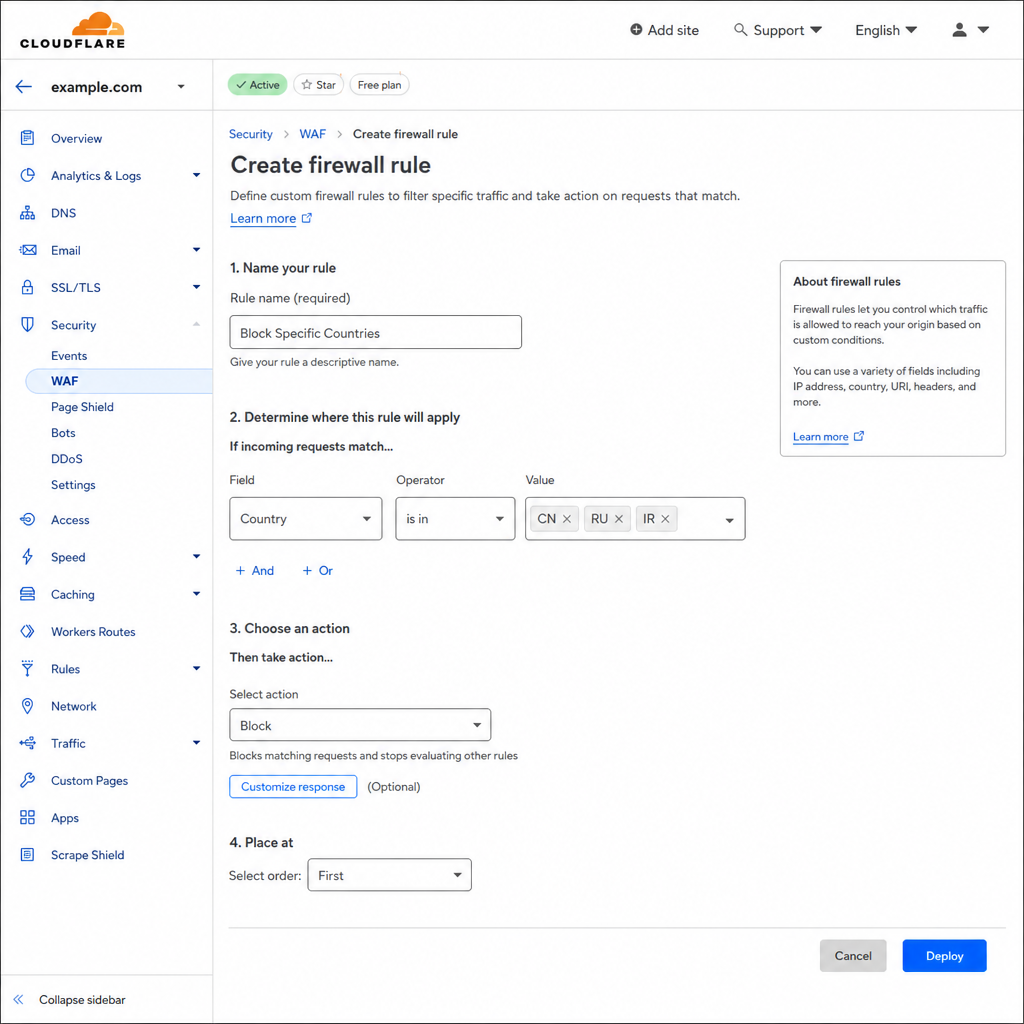
- Create Firewall Rules:
- Navigate to the Security > WAF (Web Application Firewall) section in Cloudflare.
- Click Create firewall rule.
- Name your rule (e.g., "Block Restricted Countries").
- Under "Field," select Country.
- Under "Operator," select equals or is in.
- Under "Value," select the countries you want to block.
- Under "Choose an action," select Block.
- Deploy: Click save. The block will propagate globally within minutes.
Using Cloudflare is the ultimate way of geofencing Shopify store traffic. It catches bots, proxy users, and bad actors instantly, keeping your Shopify analytics clean and your store secure.
Critical Considerations Before You Block
Blocking countries might seem like a quick fix, but it carries broader implications for your business. Before you flip the switch, consider these crucial factors.
The Impact of Country Blocking on SEO
One of the most overlooked dangers of blocking countries is the impact of country blocking on SEO (Search Engine Optimization).
Googlebot, Bingbot, and other major search engine crawlers primarily operate out of data centers located in the United States. If you decide to block the US because you only want to sell locally in Europe, you will accidentally block Google from crawling your site. If Google cannot crawl your site, your store will completely disappear from search engine results.
How to avoid this:
- If using an app, ensure it has a specific "whitelist search engine bots" feature.
- If using Cloudflare, go to the WAF settings and ensure "Known Bots" are allowed to bypass firewall rules.
- Instead of a hard block, consider using how to restrict shipping zones in Shopify so crawlers can still see your content.
Legal and Privacy Concerns
When you track, redirect, or block users based on their IP addresses, you are processing personal data. This brings up the issue of GDPR compliance for international visitors.
Under the General Data Protection Regulation in the EU (and similar laws like the CCPA in California), IP addresses are considered personally identifiable information (PII). If you are using third-party apps to log and block these IPs, ensure your store's Privacy Policy explicitly states that you collect IP data for security and fraud prevention purposes. Fortunately, security and fraud prevention generally fall under "legitimate interest" in GDPR framework, but transparency remains legally required.
Frustrated Legitimate Customers
Be mindful of expatriates, travelers, or people using corporate VPNs. A legitimate customer from your target market might be on vacation in a blocked country and find themselves unable to make a purchase.
Always provide a support email address on your blocked page. For example: "Access from your region is currently restricted. If you believe this is an error, please contact us at support@yourstore.com."
Best Practices for Managing International Traffic
To wrap up your global traffic strategy, keep these best practices in mind:
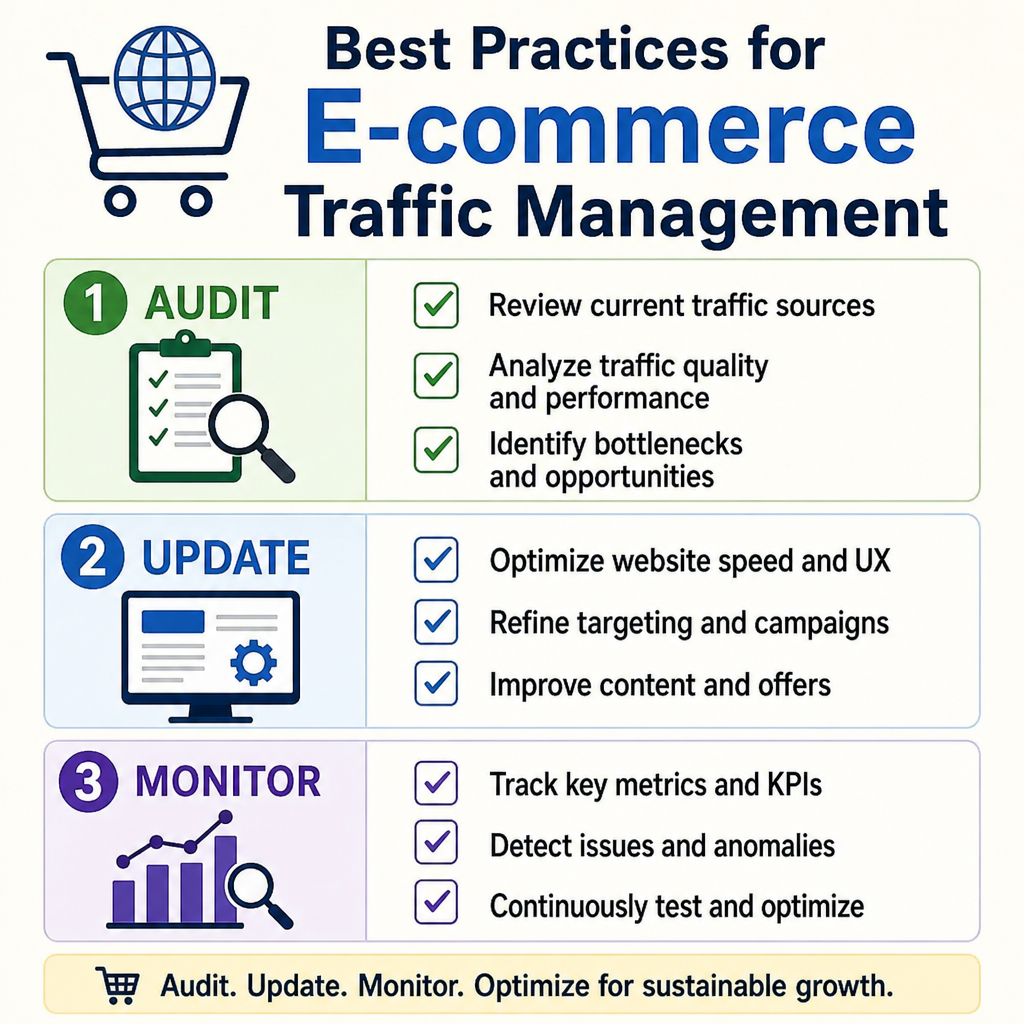
- Audit Your Traffic First: Before blocking anyone, look at your Shopify Analytics or Google Analytics. Are those visitors actually harming your conversion rate, or are they just browsing? Only block if there is a tangible negative impact (fraud, spam, site speed).
- Start Soft, Then Go Hard: Start by utilizing Shopify Markets internationalization features to tailor the experience. If fraud persists, restrict shipping zones. If bots persist, use an app. If DDoS attacks occur, escalate to Cloudflare.
- Keep Blocking Rules Updated: Geopolitics, shipping routes, and your business capabilities will change over time. Review your blocked country list every six months to ensure you aren't leaving money on the table in emerging markets.
- Monitor Your Error Logs: Keep an eye on the analytics provided by your blocking app or Cloudflare. If you notice a massive spike in blocked traffic from a country you usually do business with, you may have accidentally blacklisted the wrong region.
Conclusion
Figuring out how to block visitors from specific countries on Shopify empowers you to take absolute control over your digital storefront. Whether you are aiming to cut down on fraudulent chargebacks, comply with strict vendor licensing agreements, or simply optimize your server for your target demographic, you have multiple avenues to success.
For most merchants, leveraging the best Shopify apps for country blocking provides the perfect balance of ease and functionality. However, if you crave ultimate security and bot protection, stepping up to Cloudflare's server-level firewall rules is a game-changer.
Take a careful look at your data, weigh the SEO and customer experience implications, and choose the geofencing strategy that perfectly aligns with your e-commerce goals. By securing your digital borders, you ensure a faster, safer, and more profitable shopping experience for your true customers.
Frequently asked questions
- Can I block specific countries without an app?
- Yes, but it requires technical knowledge and comes with caveats. Because Shopify is a hosted platform, you do not have access to backend .htaccess files or server-level configurations. To block users natively, you have to rely on frontend coding by customizing Liquid code and injecting a JavaScript snippet that calls an IP geolocation API. A tech-savvy user can bypass this by disabling JavaScript.
- Will blocking countries hurt my SEO?
- It can. Googlebot, Bingbot, and other crawlers primarily operate out of data centers in the United States. If you block the US, you can accidentally block Google from crawling your site. Use an app that whitelists search engine bots, or in Cloudflare allow Known Bots to bypass firewall rules.
- Is country blocking GDPR-compliant?
- When you track, redirect, or block users based on IP addresses, you are processing personal data. Under GDPR and similar laws like CCPA, IP addresses are considered personally identifiable information. Security and fraud prevention generally fall under legitimate interest, but your Privacy Policy must explicitly state that you collect IP data for security and fraud prevention purposes.
- What is the difference between blocking, redirecting, and restricting checkout?
- Blocking prevents the customer from accessing the store. Redirecting sends the customer to a different page (such as a localized storefront). Restricting checkout allows browsing and cart access but prevents the purchase from completing — useful for B2B or membership-only stores.
People Also Ask
- Shopify's native settings let you restrict shipping zones to exclude countries entirely — orders can't be placed to a country not listed in your shipping zones, which is the cleanest built-in method.
- Common reasons are high fraud/chargeback rates from specific regions, inability to ship reliably there, or products restricted by export regulations.
- No — it stops orders using that shipping address, but doesn't prevent someone from using a different billing/shipping combination or VPN. It's one layer, not a complete fraud solution.
Related resources
Related service pages
Want to see how this would look for your brand?
We'll walk through your current support stack, ticket categories, and tooling — and show you what an operationalized version looks like inside Zendesk, Gorgias, or Help Scout.