
Operations
How to Safely Handle a Customer Requesting a Refund Before Their Order Arrives
By Patrick · Founder, Virtual Freelance Solutions · 10+ years in eCommerce customer support
Introduction
Dealing with a refund before order arrives Shopify scenario is one of the most frustrating challenges ecommerce merchants face. You have already paid for shipping, the inventory is out of your hands, and your revenue is technically in limbo.
So, what do you do? Can customers request a refund before receiving a package? The short answer is yes, they can ask. However, whether you grant it immediately, wait for the item to be returned, or offer an alternative depends entirely on the systems you have put in place.
In this comprehensive guide, we will explore everything related to Refund before order arrives on Shopify: policies and scripts to handle refund requests while package is in transit. From setting up ironclad legal pages to managing logistics and customer service, you will learn exactly how to protect your profit margins while keeping your buyers happy.

Understanding the "Mid-Transit" Cancellation Request
Before diving into policies and scripts, it helps to understand why a customer might want to cancel an order that is already on a delivery truck. Generally, these requests fall into two categories:
- Shipping Delays: The courier is taking longer than expected, and the customer needs the item by a specific date (like a birthday or holiday).
- Buyer's Remorse: The customer found the item cheaper elsewhere, made an impulsive purchase, or simply realized they do not have the budget for it.
Handling Buyer's Remorse During Delivery Transit
When dealing with buyer's remorse, you must walk a fine line. You want to provide excellent customer service, but you also cannot afford to bleed money on shipping costs and lost inventory. Handling buyer's remorse during delivery transit requires a firm but polite approach. Your primary goal is to inform the customer that while you are happy to process a return, the physical package must be redirected or sent back to your warehouse before the funds are released.
Crafting Your Shopify Refund Policy for Items in Transit
The most powerful weapon you have against messy refund disputes is a clear, easily accessible policy. If your terms are vague, you leave yourself vulnerable to chargebacks and angry reviews.
A robust Shopify refund policy for items in transit should explicitly state what happens when an order leaves your facility. You cannot physically stop a mail truck, and your customers need to understand that.
Key Elements to Include in Your Policy:
- Processing Times vs. Shipping Times: Clearly define the difference. Explain that once an order is handed over to the carrier, delivery speed is outside of your control.
- Rules for Canceling an Order After It Has Shipped: State clearly that once an order has been dispatched and a tracking number generated, it cannot be canceled outright. The customer must initiate a standard return process once the item arrives.
- Restocking Fees: Consider implementing a restocking fee for orders canceled mid-transit. This helps recoup the non-refundable shipping costs and the labor required to process the return. Make sure this fee (e.g., 10% to 15%) is mentioned clearly at checkout.
- Refused Packages: Outline what happens if the customer simply refuses delivery. State that return shipping costs will be deducted from their final refund.
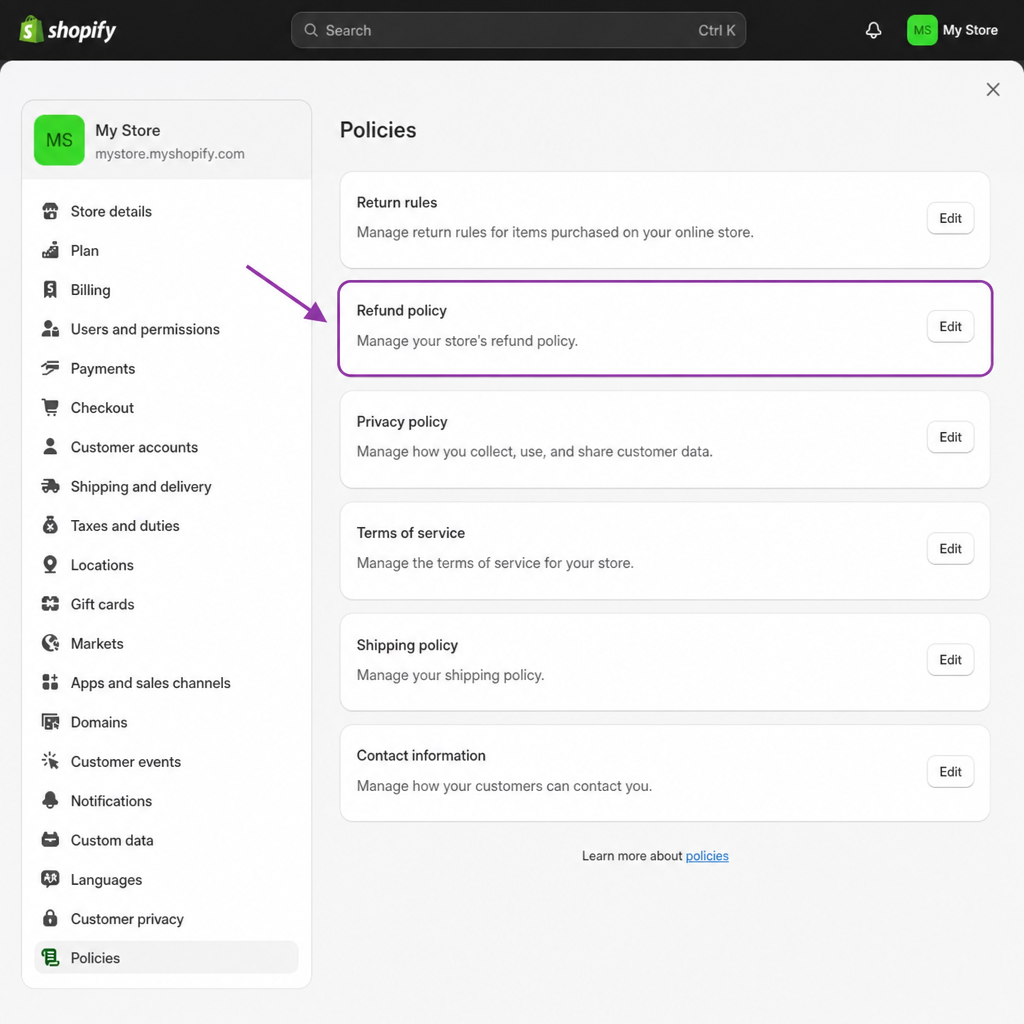
To add these policies to your store, navigate to your Shopify Admin dashboard, go to Settings > Policies, and update your Refund Policy text. Ensure a link to this policy is present in your footer and on your checkout page.
Logistics: Package Intercept vs Return to Sender
When a customer demands a refund for an item in transit, you have a logistical decision to make. How do you get your product back safely? You generally have two options: package intercept vs return to sender.
1. Package Intercept
Major couriers like USPS, UPS, and FedEx offer a "Package Intercept" service. For a fee (usually around $15 to $20 plus any applicable return postage), you can request that the carrier stop the package before it reaches the customer and reroute it back to your warehouse.
- Pros: Prevents the customer from receiving the item, eliminating the risk that they keep the product and demand a refund.
- Cons: It is expensive and not guaranteed. If the package is already out for delivery, an intercept will fail.
2. Return to Sender (RTS)
The alternative is advising the customer to simply write "Return to Sender" on the unopened package and hand it back to the mail carrier.
- Pros: Usually free for the merchant and the customer (depending on the courier and mail class).
- Cons: Requires the customer to cooperate. If they open the package, the RTS option is voided, and they will need a new return label.
If the customer accepts the package but still wants to return it, you will need to generate return to sender shipping labels through Shopify or your third-party shipping app (like ShipStation or Shippo). Deducting the cost of this label from the customer's final refund is a standard ecommerce practice that should be outlined in your policy.
Proactive Strategies to Prevent In-Transit Refunds
The best way to handle refund requests is to prevent them from happening in the first place. Often, customers panic and request a refund because they feel left in the dark about their order's location.
Managing Customer Expectations for Shipping Times
Be brutally honest about your shipping times. If you dropship or use a slow fulfillment method, do not promise 2-day delivery. Place estimated delivery dates on the product page, in the cart, and at checkout. Managing customer expectations for shipping times is the foundation of trust.
Shopify Order Status Page Customization
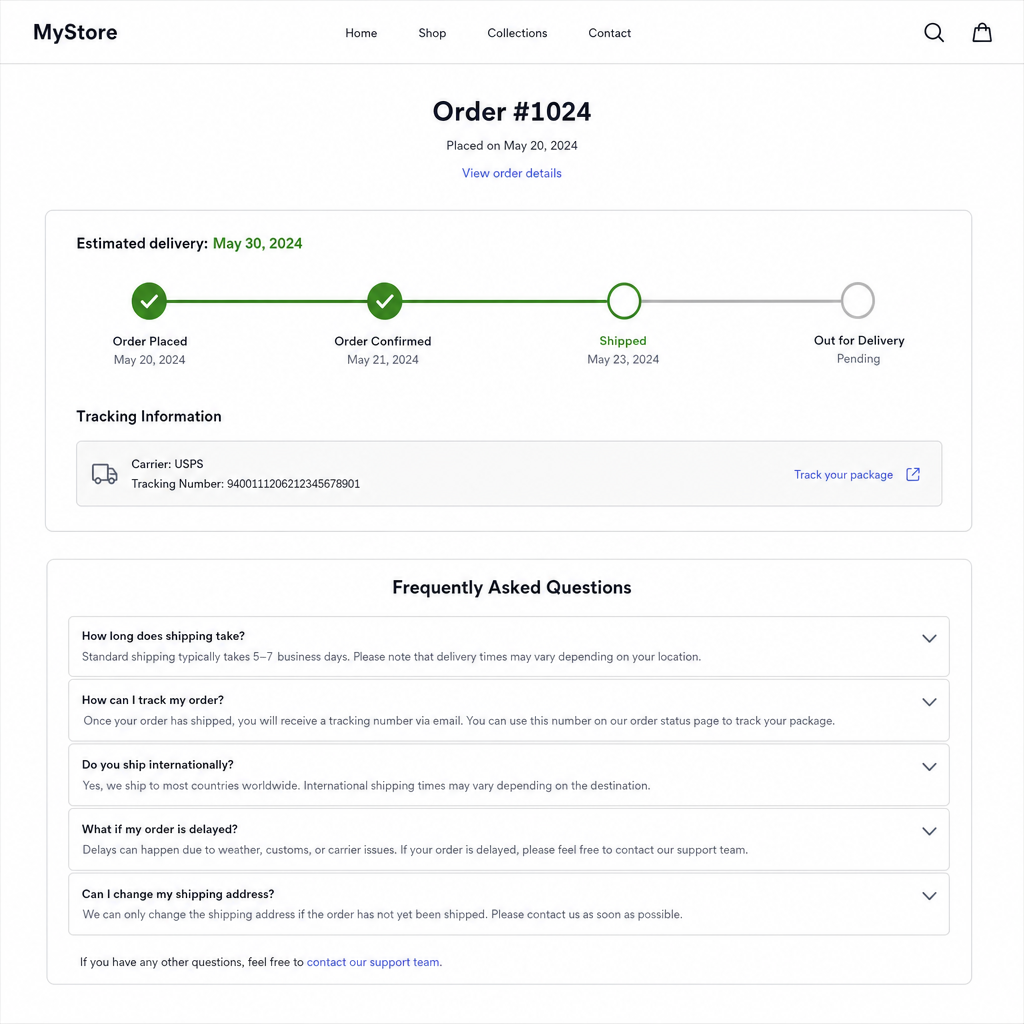
By default, Shopify provides an order confirmation page that customers can revisit to check their tracking. However, you can enhance this. Utilizing Shopify order status page customization allows you to add custom text, FAQs, or a timeline that explains potential carrier delays. You can do this by going to Settings > Checkout > Order status page and adding custom scripts or HTML to reassure customers that their package is moving safely.
Automated Email Templates for Shipping Delays
If you notice a weather event or a supply chain issue is slowing down your carriers, get ahead of the problem. Use automated email templates for shipping delays via Klaviyo or Shopify Email.
Example proactive email:
"Hi [Name], we noticed your package is taking a little longer than expected to reach you. Carrier delays occasionally happen, but rest assured, your order is secure and on its way! You can track its progress here: [Link]."
By communicating first, you drastically reduce the number of people demanding their money back.
Customer Service Scripts to Handle Refund Requests While Package is in Transit
Even with perfect systems, you will inevitably receive these requests. When you do, your customer service team must respond with empathy, professionalism, and strict adherence to your policies.
Below is a highly effective customer service script for refund requests during shipping tailored to different scenarios.
Script 1: The "Buyer's Remorse" Cancellation Request
Use this script when a customer emails you saying they changed their mind, but the order has already left your warehouse.
Subject: Update regarding your cancellation request for Order #[Order Number]
Hi [Customer Name],
Thank you for reaching out! I completely understand that you would like to cancel your recent order.
I have checked our system, and it looks like your package has already been picked up by [Carrier Name] and is currently in transit to you. Because it has left our facility, we are unable to cancel the shipment at this exact moment.
However, we still want to help you with your return! Once the package arrives, please keep it unopened and write "Return to Sender" clearly on the front, then hand it back to your local postal worker. Alternatively, let us know when it arrives, and we can issue a return shipping label.
As soon as the tracking updates to show the package is heading back to our warehouse, we will immediately process your refund [Optional: minus a small restocking fee as per our policy].
Let me know how you would like to proceed, and we will get this sorted for you!
Best regards, [Your Name / Store Name]
Script 2: How to Handle Late Delivery Refund Requests
When dealing with delayed packages, the customer is usually frustrated. How to handle late delivery refund requests involves de-escalation and offering compromises.
Subject: Your shipment for Order #[Order Number]
Hi [Customer Name],
I am so sorry to see that your order has not arrived by the expected date. I know how frustrating it is to wait for a package, especially when you are excited to receive it.
I have checked the tracking with [Carrier Name], and your package is still in transit, but experiencing a carrier delay. Because the package is actively moving in the postal network, we cannot issue a full refund while it is on its way to you.
We truly appreciate your patience. If the package does not arrive by [Date—usually 7-10 days after the expected date], we will consider it lost in transit and gladly issue a full refund or send a free replacement immediately.
Thank you for bearing with us during this brief delay.
Warmly, [Your Name / Store Name]

Issuing Partial Refunds for Shipping Delays
If a customer paid for expedited shipping and the courier failed to deliver on time, refusing a refund will likely lead to a furious buyer and a potential chargeback. A great middle-ground is issuing partial refunds for shipping delays.
You can reply with:
"Because the carrier missed their delivery window, I have gone ahead and refunded your $15 expedited shipping fee back to your original payment method. The package is still on its way, and we are monitoring it closely for you."
This gesture costs you a small amount but saves the entire sale and preserves customer loyalty.
Protecting Your Business Financially
Handling refunds mid-transit isn't just about customer service; it is about protecting your cash flow. If a customer feels ignored or cheated, they will bypass you entirely and go to their bank.
Preventing Chargebacks for Delayed Deliveries
A chargeback occurs when a customer disputes a charge with their credit card company, claiming they never received the item. If a package is delayed in transit and the customer files a chargeback, you will not only lose the money and the product, but you will also pay a hefty chargeback fee to Shopify (typically $15).
Preventing chargebacks for delayed deliveries requires a documented trail of evidence:
- Always use tracked shipping: Never ship economy without a tracking number.
- Respond promptly: Acknowledge their emails within 24 hours. A customer who feels heard is 90% less likely to call their bank.
- Submit your evidence: If a chargeback is filed while the item is in transit, submit the tracking link, your communication logs (showing you offered a return upon arrival), and a screenshot of your store's shipping policy to the bank via Shopify Admin.
Shipping Insurance for Lost or Delayed Orders
Sometimes, an item isn't just delayed; it falls off the face of the earth. The tracking stops updating, and the customer is rightfully demanding their money. In these instances, you shouldn't have to foot the bill. Utilizing shipping insurance for lost or delayed orders is a lifesaver. Apps like Route, Navidium, or even default carrier insurance (Priority Mail includes up to $100 coverage) allow you to file a claim. If a package is stuck in transit for an unreasonable amount of time (usually 15 to 30 days depending on the carrier), you can refund the customer from your pocket and let the insurance payout reimburse your business.
Conclusion: Take Control of In-Transit Refunds
Navigating a refund before order arrives Shopify scenario does not have to be a nightmare of lost profits and angry emails. While the situation is inherently tricky, establishing clear rules and communicating effectively makes all the difference.
By taking the time to write a watertight policy, utilizing proactive tracking updates, and arming your support team with the right scripts, you transform a potential crisis into a smooth, standard operational procedure. Remember: you cannot control the postal service, but you can control how you prepare your business and how you treat your customers. Implement these strategies today, and safeguard your Shopify store against the headaches of mid-transit cancellations.
Our customer service specialists are expert negotiators. We don't just hit the Refund button — we save your revenue by managing difficult policy conversations for you. See our pricing to get started.
People Also Ask
- For low-value orders, refunding on trust is often cheaper than the support time spent investigating — for higher-value orders, checking tracking status and delivery confirmation first is worth the extra step.
- Look for patterns — repeat claims from the same customer, mismatched shipping/billing addresses, or tracking that shows delivered. One isolated claim with no red flags is usually genuine.
- Note the tracking status at time of refund, the reason given, and whether it's a one-time exception or fits your written policy — this protects you if the pattern needs review later.
Related resources
Related service pages
Want to see how this would look for your brand?
We'll walk through your current support stack, ticket categories, and tooling — and show you what an operationalized version looks like inside Zendesk, Gorgias, or Help Scout.