
Operations
What to Do with a Shopify High Risk Order Analysis Flag
By Patrick · Founder, Virtual Freelance Solutions · 10+ years in eCommerce customer support
Introduction
Suddenly, you are faced with a difficult dilemma. Do you fulfill the order and risk a costly chargeback, or do you cancel it and risk losing a legitimate sale (and offending a real customer)?
Navigating this tricky situation requires a clear understanding of Shopify high risk order analysis: how to read fraud analysis and decide to cancel or ship. In this comprehensive guide, we will break down exactly what those warnings mean, how to investigate them, and the best practices for protecting your ecommerce business from malicious actors.
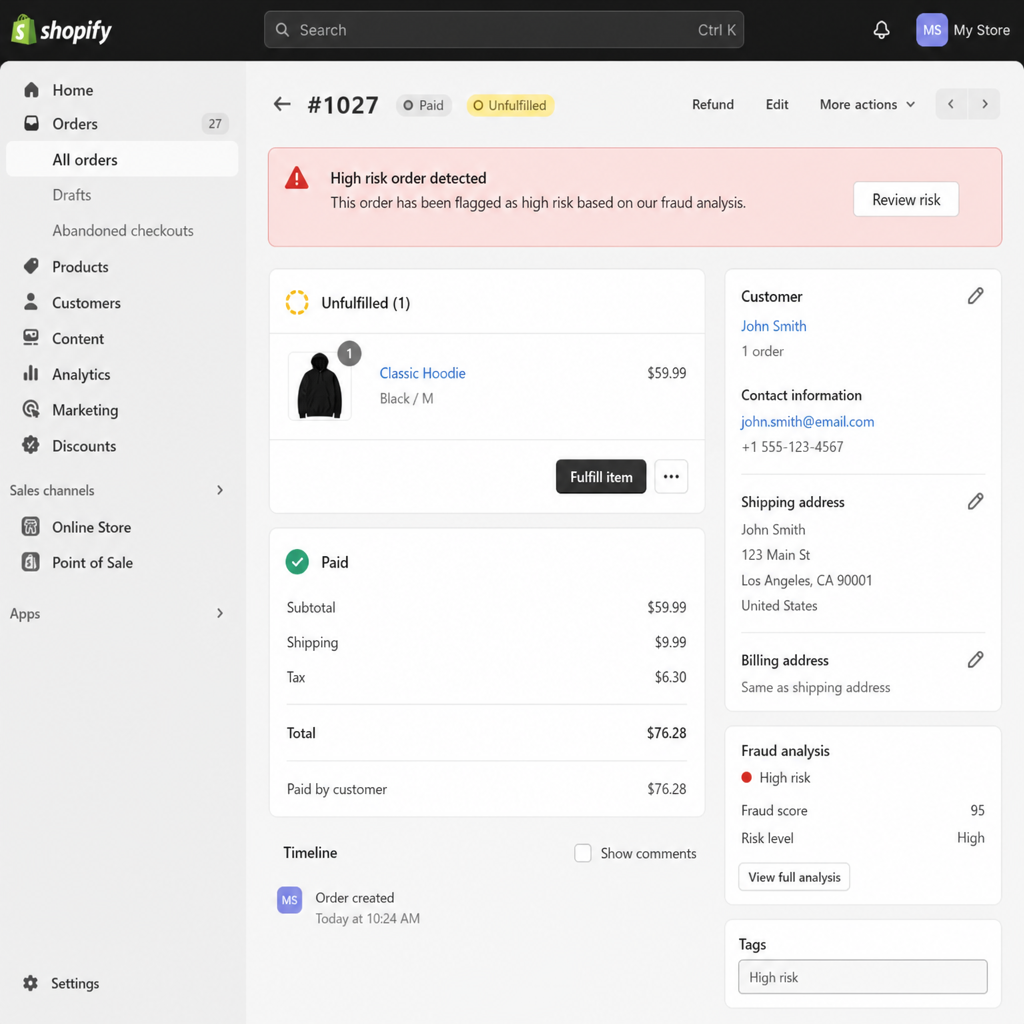
Shopify Risk Levels Explained
Before diving into complex fraud metrics, you need to understand how Shopify evaluates transactions. Shopify's built-in fraud analysis uses machine learning algorithms—trained on data from millions of transactions across the platform—to assess the legitimacy of every credit card order.
To make things simple for merchants, Shopify risk levels explained generally fall into three categories:
- Low Risk (Green): The transaction appears completely normal. The billing details match the shipping details, the IP address matches the customer's location, and the credit card security checks passed. You can fulfill this order with confidence.
- Medium Risk (Yellow): The system has detected a few inconsistencies. For example, the customer might be using a web proxy, or their billing and shipping addresses are in different states. Medium-risk orders require a quick second look, but they are often legitimate.
- High Risk (Red): The system has identified multiple, severe red flags consistent with stolen credit card usage or coordinated fraud rings. These orders require immediate attention and a thorough investigation before fulfillment.
Understanding your Shopify high risk order analysis is the first line of defense in maintaining a profitable, secure store.
Decoding the Red Flags: Shopify Fraud Indicators Meaning
When you click on the "Fraud Analysis" section of a flagged order, Shopify provides a list of indicators marked with green checkmarks, yellow dots, or red caution signs. To make an informed decision, you must grasp the Shopify fraud indicators meaning.
Here are the most common red flags and what they actually tell you:
1. Address Verification and Security Codes
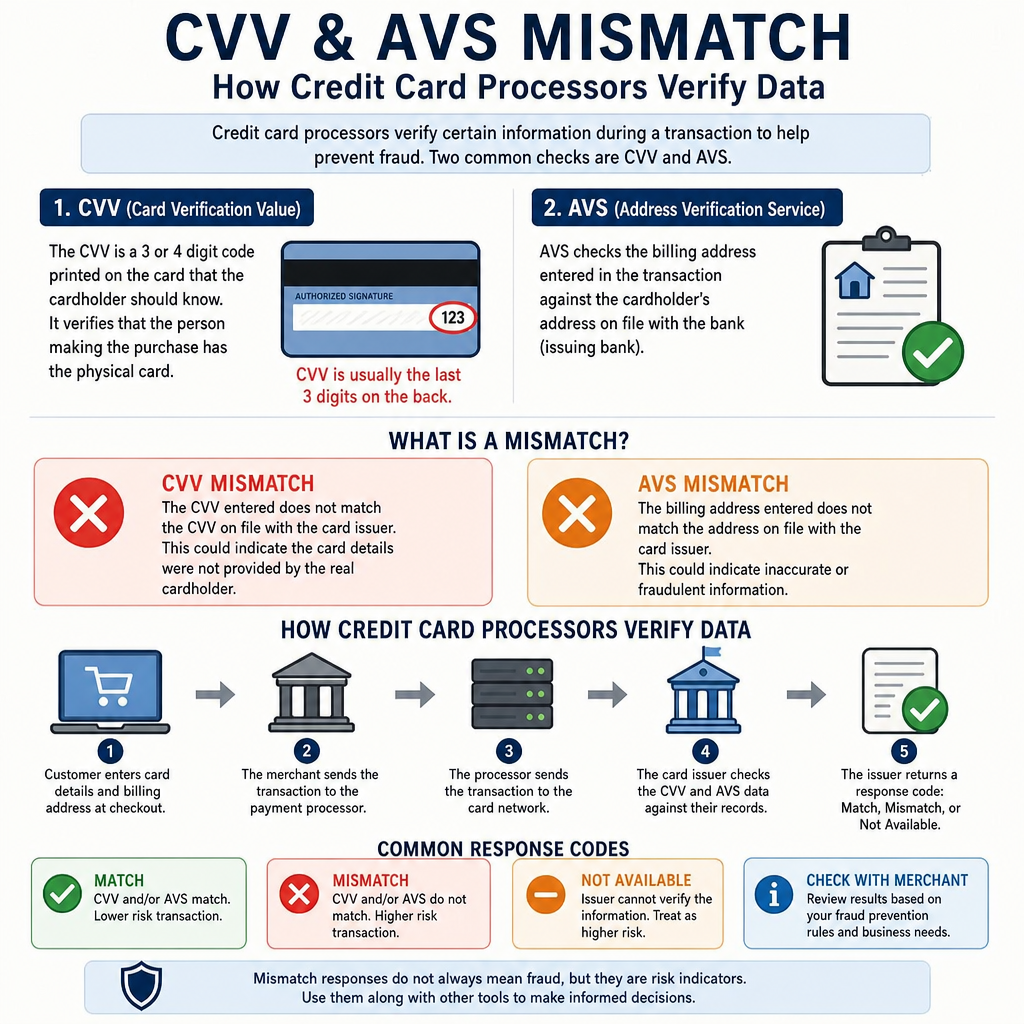
One of the most frequent reasons an order is flagged involves the AVS and CVV codes. Understanding the CVV and AVS mismatch shopify meaning is crucial.
- CVV (Card Verification Value): This is the 3- or 4-digit code on the back of the card. If the CVV is incorrect, it means the buyer likely doesn't have the physical card in their hands. This is a massive red flag.
- AVS (Address Verification System): This compares the numeric portion of the customer's billing address and zip code with the information on file with the credit card issuer. If the AVS fails, the buyer is guessing the address attached to the stolen card.
2. IP Address Discrepancies
Shopify tracks the IP address of the device used to place the order. If a customer claims their billing address is in Ohio, but their IP address shows they are placing the order from a high-fraud region in Eastern Europe or Southeast Asia, the order will be flagged. Furthermore, if the system detects that the IP address is associated with a known web proxy or VPN (used to hide the buyer's true location), the risk level spikes.
3. Distance Between Billing and Shipping Addresses
While people do buy gifts for friends and family across the country, a massive distance between the billing and shipping address combined with other red flags is highly suspicious. Identifying fake billing addresses on Shopify often comes down to this geographic mismatch. Fraudsters usually ship stolen goods to a freight forwarder, an empty house, or an accomplice, using the victim's address for billing to bypass the AVS check.
4. Multiple Payment Attempts
If the fraud analysis shows that the customer attempted to process the payment five times using five different credit cards before one finally went through, this is known as "card testing." Fraudsters use ecommerce sites to test lists of stolen credit card numbers to see which ones are still active.
Dropshipping Vulnerabilities
If you operate a dropshipping model, you need to be especially vigilant. Because dropshippers often deal with high volumes of automated orders, fraudsters specifically target them. The red flags for Shopify dropshipping fraud include:
- Unusually large orders (e.g., ordering 10 high-value electronics at once).
- Requests for expedited, overnight shipping regardless of the cost (fraudsters don't care about shipping costs because they aren't paying with their own money; they just want the goods before the card is reported stolen).
- Nonsensical email addresses (e.g., john.doe.993847@gmail.com).
Your Action Plan: How to Handle High Risk Orders on Shopify
When a high-risk order lands in your queue, do not panic, and do not immediately hit the "Fulfill" button. You need a standardized process to evaluate the situation.
If you are wondering what to do with high risk shopify orders, use this step-by-step Shopify order verification checklist to conduct your investigation:
1. Analyze the Fraud Indicators
Review the specific red flags. Is it just a billing/shipping mismatch (which could be a gift), or did the AVS and CVV both fail while the IP address is routed through a proxy? The latter is almost certainly fraud.
2. Verify the Customer's Identity via Phone
The fastest way to verify an order is to call the phone number provided.
- If the number is disconnected or rings to a generic, unidentifiable voicemail, be highly suspicious.
- If someone answers, ask them to verify their billing address and the items they ordered. Fraudsters who are processing hundreds of stolen cards a day will rarely know these details off the top of their head.
3. Send a Verification Email
If you cannot reach them by phone, send a polite email. State that your payment processor flagged the transaction for security reasons and request that they reply to confirm their identity. Sometimes, legitimate customers will immediately reply, explaining that they are traveling (explaining the IP mismatch) or recently moved (explaining the AVS mismatch).
4. Research the Address and Email
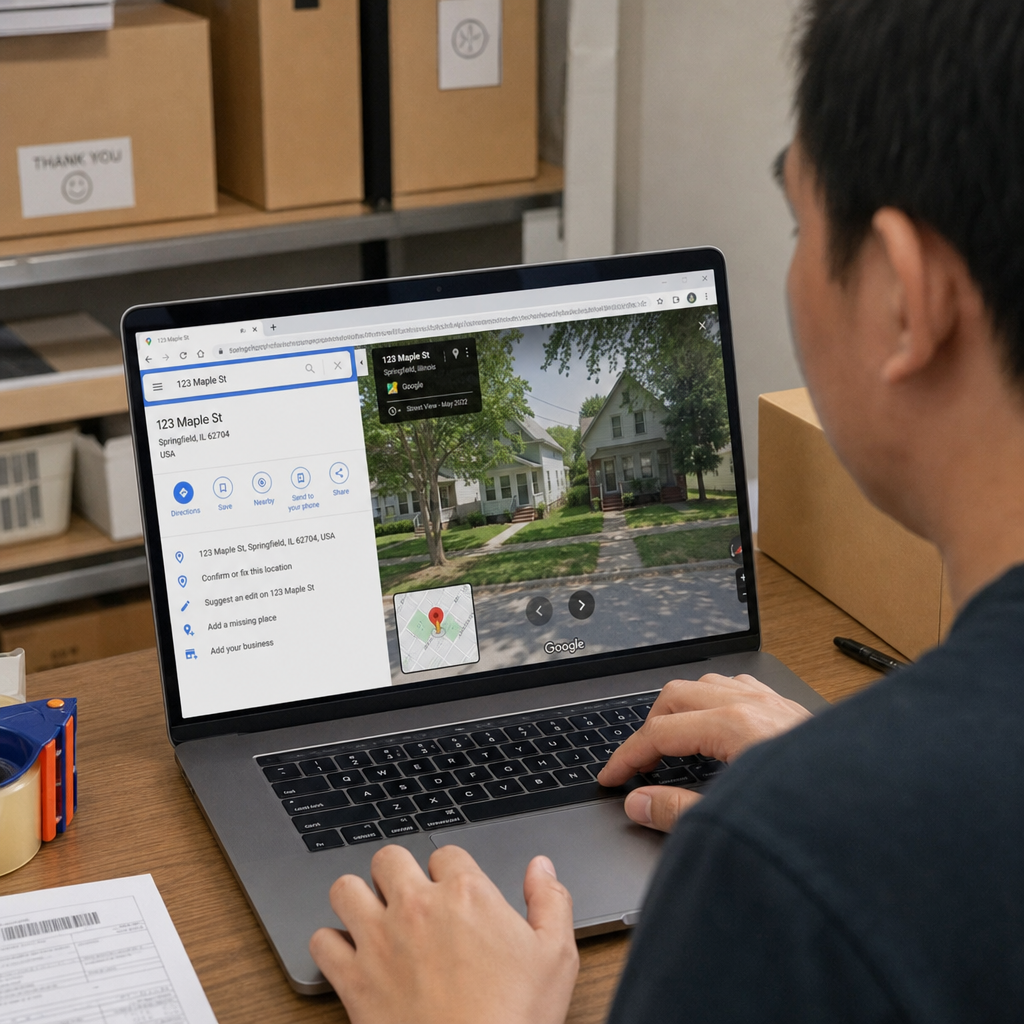
Pop the shipping address into Google Maps and use Street View. Is it a residential home, or is it a known freight forwarding warehouse in an industrial park? Search the customer's email address on Google. Does it pull up a legitimate LinkedIn profile or business page, or is it associated with scam-warning forums?
5. Request Additional Documentation (Optional but Effective)
For very high-ticket items, you might want to ask the customer to email a photo of their ID next to the credit card used (with the middle digits covered for security). Real customers might find this slightly annoying, but they will usually comply to get their expensive item. Fraudsters will simply ignore the email and move on to an easier target.
Cancel or Ship? Deciding When to Fulfill Risky Orders
After you have run through your checklist, you must make a final decision. Deciding when to fulfill risky orders is ultimately about risk tolerance.
When to Cancel the Order
You should cancel and refund the order immediately if:
- The customer's phone number is disconnected.
- They do not respond to your verification emails within 48-72 hours.
- The CVV failed, and the IP address is highly suspicious.
- The order just "feels" wrong after your investigation.
Actionable Tip: When canceling a fraudulent order on Shopify, be sure to check the box that says "Restock items" and choose "Fraudulent order" as the reason. This helps train Shopify's machine-learning algorithms to better protect your store in the future.
When to Ship the Order
You can consider fulfilling the order if:
- You spoke to the customer on the phone and they provided a logical explanation for the red flags.
- The email matches their verified social media profiles.
- They provided requested ID verification.
- The risk is mostly tied to a billing/shipping address mismatch for an obvious gift purchase (e.g., buying flowers or a custom mug).
The True Cost of Fraud: Preventing Credit Card Chargebacks Shopify
Why is all of this investigation necessary? Because if you ship a fraudulent order, the true cardholder will eventually notice the unauthorized charge and contact their bank. The bank will issue a chargeback, forcibly removing the funds from your account to refund the victim. Preventing credit card chargebacks shopify is critical because the cost to your business goes far beyond the lost sale. If a $100 fraudulent order slips through, you lose:
- The $100 revenue (clawed back by the bank).
- The cost of the physical product you shipped to the scammer.
- The cost of the shipping and packaging materials.
- A non-refundable chargeback fee imposed by your payment gateway (usually around $15).
Furthermore, if your store receives too many chargebacks, your payment processor may deem you a high-risk merchant, leading to frozen payouts, higher processing fees, or the complete loss of your merchant account. Solid ecommerce fraud protection for Shopify stores is not just about saving a few dollars; it is about protecting the lifeblood of your business.
Automated vs Manual Fraud Detection: Scaling Your Security
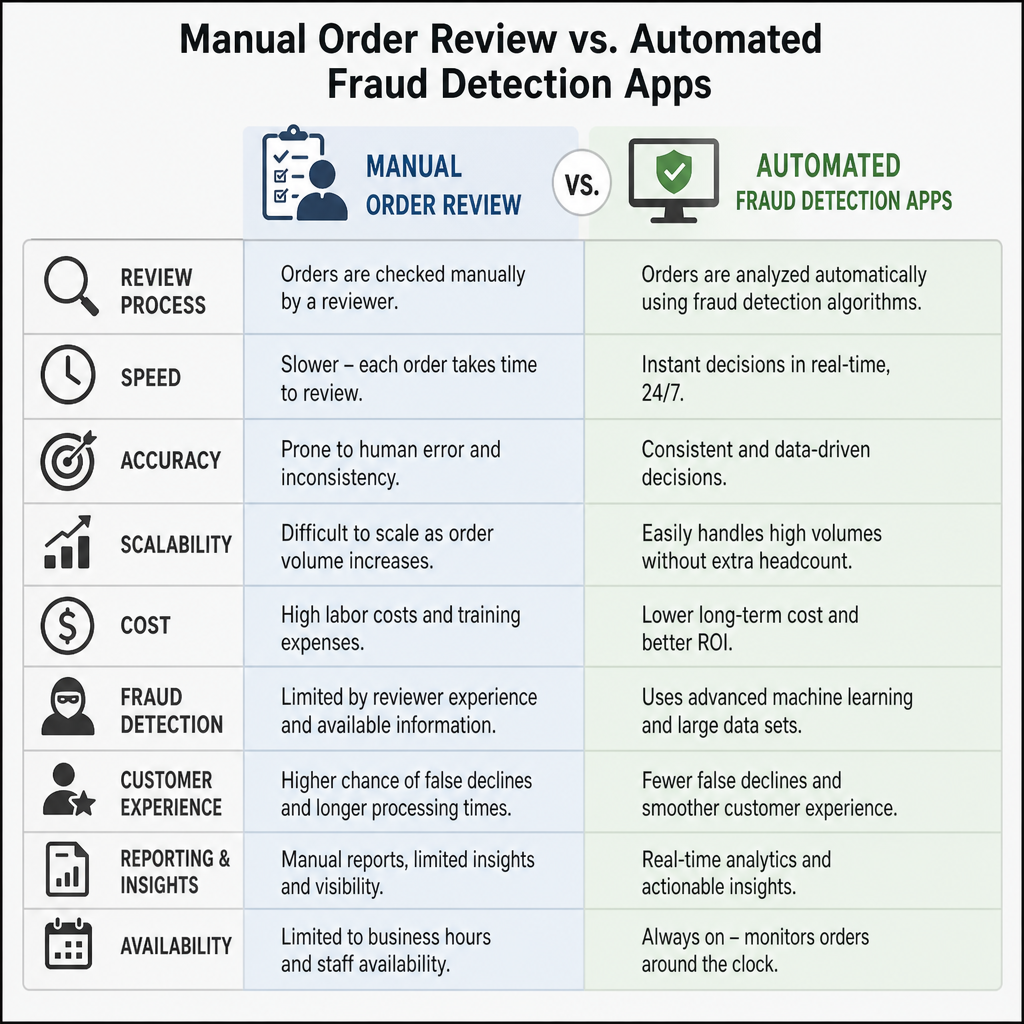
When your store is small and you are getting 10 orders a day, manually reviewing high-risk orders is manageable. But what happens when you scale to 500 orders a day? You cannot afford to spend hours playing detective.
This brings up the debate of automated vs manual fraud detection shopify.
Shopify Fraud Filter vs Manual Review
Shopify offers a free app called Fraud Filter. This tool allows you to create custom rules to automate how your store handles risky orders. For instance, you can set a rule that automatically cancels any order where the AVS fails, or automatically flags any order over $500 for manual review.
The comparison of Shopify fraud filter vs manual review comes down to volume. Manual review offers a human touch and saves potentially false-positive flags (legitimate customers who triggered a warning by accident). However, automated filters save vast amounts of administrative time and instantly shut down basic fraud attempts without you having to lift a finger.
Upgrading Your Defense: Ecommerce Fraud Protection for Shopify Stores
While Shopify's built-in analysis is excellent, high-volume merchants often require more robust, specialized solutions. Relying strictly on basic Shopify payment processing fraud protection might not be enough during massive traffic spikes like Black Friday or Cyber Monday.
If you are losing too much time to manual reviews or still suffering from chargebacks, it is time to look at third-party solutions. Here are a few top Shopify fraud analysis app recommendations:
- Signifyd: This is a powerhouse in ecommerce fraud protection. Signifyd uses vast global data networks to instantly approve or decline orders. Best of all, they offer a 100% financial guarantee against fraud. If they approve an order and it turns out to be fraudulent, they pay you back for the chargeback.
- ClearSale: ClearSale combines advanced artificial intelligence with a massive team of in-house human fraud analysts. If their AI flags an order, their team will actually conduct the manual review (even calling the customer) on your behalf before approving or declining the order.
- NoFraud: Similar to Signifyd, NoFraud offers automated decisions and chargeback guarantees. They excel at streamlining the checkout process and eliminating the need for merchant-facing manual reviews, allowing you to focus purely on growing your business.
Integrating these apps shifts the liability away from your business, ensuring that your Shopify high risk order analysis is handled by dedicated experts.
Conclusion: Taking Control of Your Store's Security
Encountering a high-risk order does not have to ruin your day. By understanding Shopify high risk order analysis: how to read fraud analysis and decide to cancel or ship, you transform a moment of panic into a routine, manageable process.
Remember to rely on the data provided by Shopify. Decode the Shopify fraud indicators meaning, pay close attention to AVS and CVV mismatches, and utilize a strict Shopify order verification checklist before fulfilling anything suspicious.
Whether you rely on diligent manual reviews, customize the free Fraud Filter app, or invest in premium ecommerce fraud protection for Shopify stores, the goal remains the same: protect your hard-earned revenue, prevent devastating chargebacks, and ensure that your legitimate customers continue to receive the stellar service they deserve. Stay vigilant, trust your instincts, and keep your business safe.
Frequently asked questions
- What does a Shopify high risk order flag mean?
- It means Shopify's fraud analysis has detected multiple severe red flags consistent with stolen credit card usage or coordinated fraud rings. These orders require immediate attention and a thorough investigation before fulfillment.
- Should I always cancel a high risk Shopify order?
- Not always. Run through a verification checklist first — analyze the indicators, call the customer, send a verification email, and research the address and email. Cancel if you cannot verify the customer or the indicators clearly point to fraud.
- What is a CVV and AVS mismatch on Shopify?
- A CVV mismatch means the 3- or 4-digit security code does not match the card issuer's records. An AVS mismatch means the billing address does not match the one on file with the bank. Both are strong indicators that the buyer may not have the physical card.
- How do I prevent credit card chargebacks on Shopify?
- Investigate every high-risk order before fulfilling, use Shopify's free Fraud Filter app to automate rules, and consider third-party apps like Signifyd, ClearSale, or NoFraud that offer chargeback guarantees.
People Also Ask
- Common triggers include mismatched billing/shipping addresses, a shipping address that doesn't match the card's country, unusually large order size for a first-time customer, or a rushed shipping method paired with a high-value cart.
- No — flagged orders need manual review, not automatic cancellation. Many flagged orders are legitimate (gift purchases, customers shipping to a different address than billing) and canceling them loses real revenue.
- Call or email the customer to confirm the order, cross-check the shipping address against a reverse lookup if needed, and hold fulfillment until you're confident it's legitimate — a short delay is cheaper than a chargeback.
Related resources
Related service pages
Want to see how this would look for your brand?
We'll walk through your current support stack, ticket categories, and tooling — and show you what an operationalized version looks like inside Zendesk, Gorgias, or Help Scout.