
Operations
How to Correctly Tag Customer Service Tickets to Improve Your Shopify Store Analytics
By Patrick · Founder, Virtual Freelance Solutions · 10+ years in eCommerce customer support
Why Tagging Customer Service Tickets is a Game-Changer
For many Shopify merchants, the immediate goal is simply to close these tickets as quickly as possible. However, if you are only focused on speed, you are sitting on a massive, untapped goldmine of business intelligence. Your helpdesk isn't just a place to put out fires; it is a real-time feedback loop. By learning exactly how to tag customer service tickets (Gorgias/Zendesk) to spot product flaws and operational glitches for Shopify stores, you can transform your support team from a reactive cost center into a proactive driver of growth.
In this comprehensive guide, we will explore exactly how to tag customer service tickets effectively. We will cover how to structure your tags, automate your workflows, and bridge the gap between your frontline support agents and your product development team.
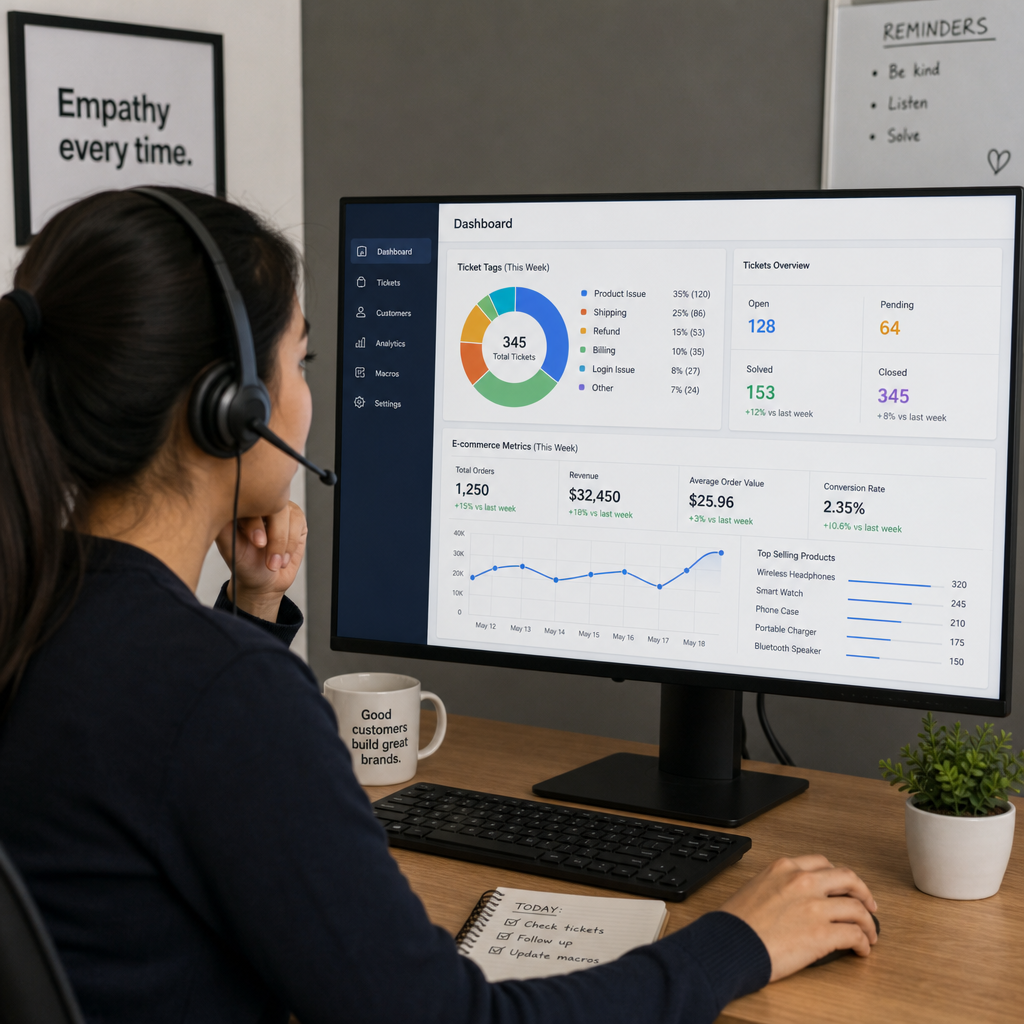
When an angry customer emails you about a broken strap on a tote bag, closing the ticket and issuing a refund solves the micro-problem. But what if 50 other customers had the exact same issue this month? Without a robust tagging system, those 50 isolated incidents are lost in a sea of data.
Proper tagging allows you to step back and look at the macro-problem. It is the secret to improving Shopify product quality with support data. When you categorize incoming queries accurately, you can:
- Identify faulty manufacturing batches before they ruin your brand reputation.
- Spot confusing user interfaces or broken links on your Shopify storefront.
- Hold your Third-Party Logistics (3PL) provider accountable for delayed shipments.
- Reduce overall ticket volume by fixing issues at their root.
How to Build a Support Ticket Tagging System
Before you can start analyzing data, you need a logical, scalable structure. Knowing how to build a support ticket tagging system requires moving away from generic tags like "complaint" or "question" and moving toward a multi-tiered hierarchy.
Creating an E-commerce Support Ticket Taxonomy Guide
An effective e-commerce support ticket taxonomy guide acts as the blueprint for your helpdesk. It dictates exactly how agents (or AI) should label incoming messages. A best practice for Shopify stores is to use a three-tiered nested tagging system:
Level 1: The Domain (Broad Category)
- Product
- Logistics
- Website
- Policy
Level 2: The Sub-Category (Specific Area)
- Product_Apparel
- Logistics_Delivery
- Website_Checkout
- Policy_Returns
Level 3: The Root Cause (The "Why")
- Product_Apparel_SizingTooSmall
- Logistics_Delivery_DamagedInTransit
- Website_Checkout_DiscountCodeFailed
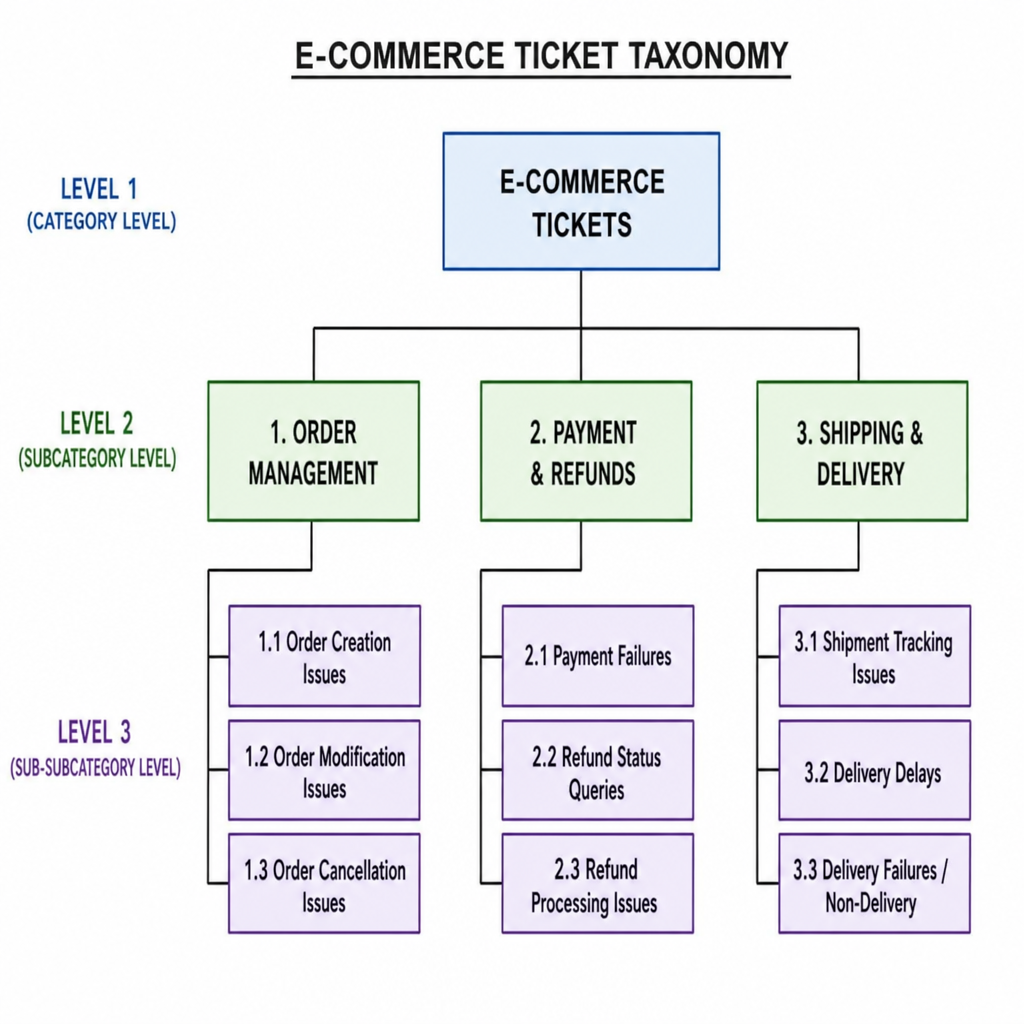
By forcing tags into this nested format, you avoid having agents create ad-hoc tags with typos (e.g., "size small," "sizing," "too small"), which ruins your reporting.
Mapping Support Tags to Product Development
The ultimate goal of this taxonomy is mapping support tags to product development. When your tags are highly specific, you can export a report at the end of the month that says, "We had 145 tickets regarding Product_Hardware_ZipperBroken."
This gives your operations and product teams the exact empirical data they need to justify switching hardware suppliers or modifying a tech pack for the next manufacturing run.
Deep Dive: Categorizing Complaints in Helpdesk Software
The two heavyweights in Shopify customer support are Zendesk and Gorgias. While the core philosophy of tagging remains the same, the execution differs slightly depending on the platform you use.
How to Categorize Customer Complaints in Zendesk
Zendesk is highly customizable, making it perfect for complex enterprise operations. When figuring out how to categorize customer complaints in Zendesk, the best approach is to use Custom Ticket Fields alongside standard tags.
Instead of making agents manually type out tags, create a custom dropdown field called "Contact Reason." Populate this dropdown with your taxonomy. When an agent selects "Product -> Defect -> Seam Tear," Zendesk can automatically append the corresponding background tags.
Furthermore, you can utilize Zendesk macros for reporting website glitches. If a customer reports that the "Add to Cart" button isn't working on mobile, an agent can click a macro titled "Bug Report: Website." This macro should:
- Reply to the customer thanking them and assuring them the tech team is looking into it.
- Automatically apply the tag Website_Bug_Mobile.
- Escalate the ticket priority.
- Send an automated Slack notification to your Shopify developers.
Leveraging Gorgias Intent Detection for Product Flaws
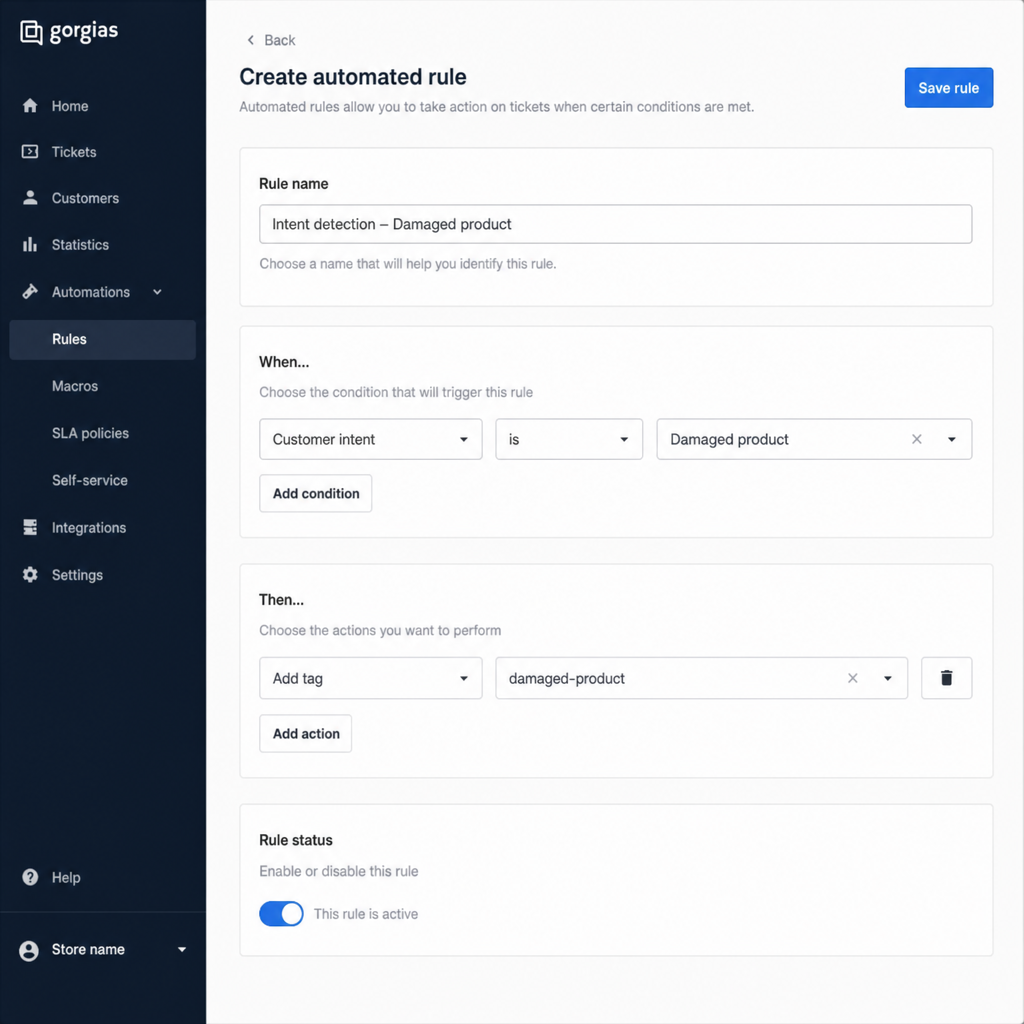
Gorgias is built specifically for e-commerce, and its machine learning capabilities make tagging incredibly efficient. One of its standout features is Gorgias intent detection for product flaws.
Gorgias analyzes the natural language of incoming emails, chats, and social media DMs. It can automatically detect sentiments like "item arrived broken" or "wrong size." You can set up Rules in Gorgias that say:
- IF Intent contains "Damaged Item"
- THEN Auto-tag the ticket with Product_Defect_Damaged and assign it to the Quality Assurance view.
Implementing automated ticket tagging for product feedback saves your agents hundreds of hours a month. It ensures that human error doesn't skew your data, allowing every piece of customer feedback to be categorized instantly.
Spotting Product Flaws and Manufacturing Defects
Customer support is the frontline of quality assurance. Your customers will notice defects long before your warehouse does.
Identifying manufacturing defects from support tickets requires a proactive approach. Let's say you launch a new line of ceramic mugs. Within a week, your tagging dashboard shows a sudden spike in the tag Product_Mug_HandleBroken.
Because you built a strong taxonomy, you can click into that tag and cross-reference it with Shopify order data. You might discover that 90% of the broken mugs came from a specific warehouse batch or were shipped using a specific carrier.
To maximize these insights, create a workflow for customer support insights for product managers.
- Weekly Syncs: Host a 15-minute weekly meeting where the Support Lead presents the top 3 product complaint tags to the Product Manager.
- Visual Dashboards: Build a real-time dashboard in your helpdesk that strictly tracks Product_Defect tags.
- Customer Follow-up: When a product manager fixes a flaw (e.g., reinforcing the mug handle in the next production run), support agents can use the tagged tickets to email those specific customers, letting them know their feedback was implemented and offering them a discount on the improved product.
Detecting Operational Glitches and Bottlenecks
While product flaws damage your brand, operational glitches bleed your profit margins dry. Proper tagging is your best defense against invisible backend inefficiencies.
Detecting Operational Bottlenecks in E-commerce Fulfillment
Fulfillment issues are notoriously difficult to track without data. If customers are constantly asking, "Where is my order?", you need to know why the order is delayed. Is it the warehouse? The carrier? A stockout?
By relying on Shopify customer service data analysis, you can categorize logistics tickets with extreme prejudice:
- Logistics_Delay_Unfulfilled (The warehouse hasn't packed it yet)
- Logistics_Delay_StuckInTransit (The carrier lost it)
- Logistics_Error_WrongItemShipped (The pick-and-pack team made a mistake)
If you notice a spike in Logistics_Delay_Unfulfilled tags every Monday, it clearly indicates detecting operational bottlenecks in e-commerce fulfillment. It tells your operations manager that the weekend shift at the 3PL is understaffed, leading to a backlog that spills into the workweek.
Streamlining Shopify Returns Through Ticket Tagging
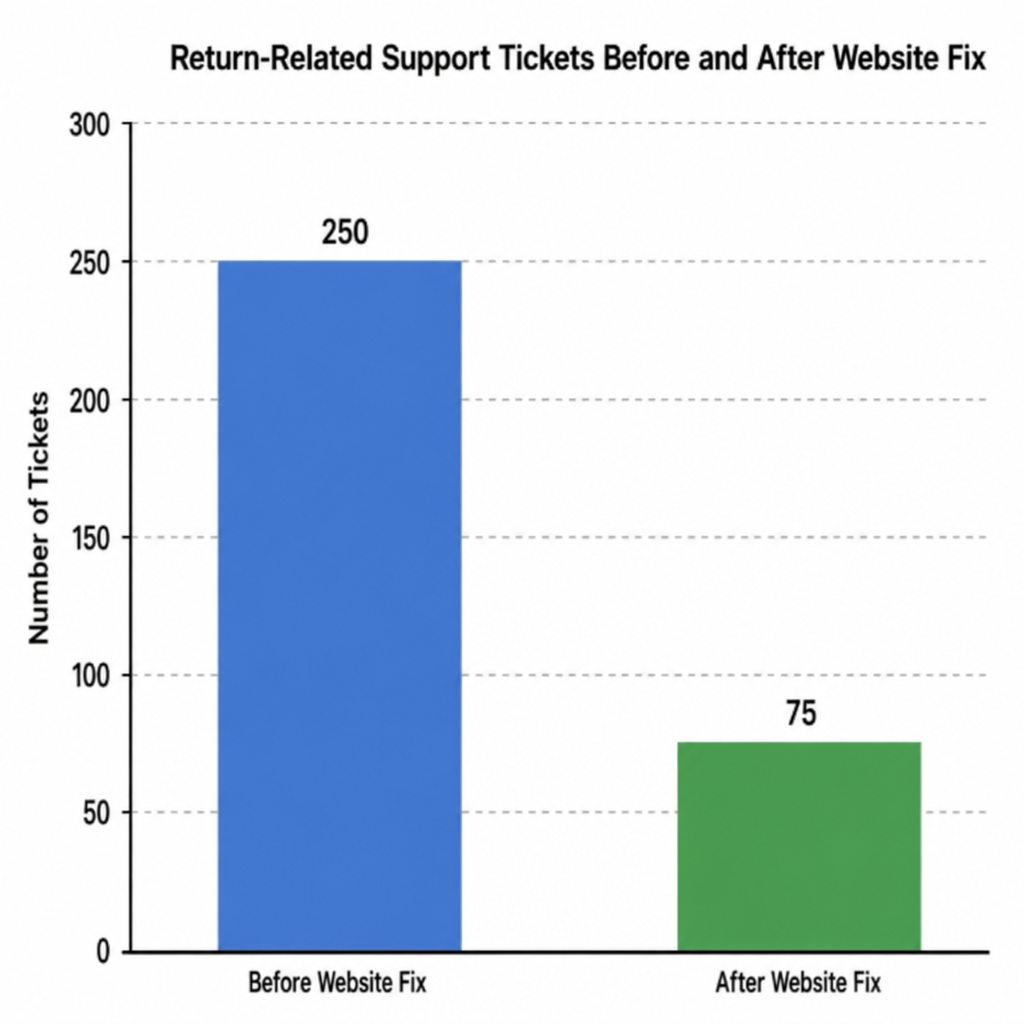
Returns are an unavoidable part of e-commerce, but they shouldn't require heavy manual intervention from your support staff. Streamlining Shopify returns through ticket tagging allows you to identify why items are coming back and where the return process is breaking down.
If you see a high volume of tickets tagged Policy_Returns_PortalError, it means your automated return portal (like Loop Returns or Returnly) is confusing customers or experiencing a technical glitch. Fixing that single glitch could reduce your ticket volume by 10%, freeing up agents to focus on pre-sales and revenue-generating conversations.
The Importance of Root Cause Analysis
Tagging is only the first half of the equation; the second half is action. Conducting a root cause analysis of recurring support issues is what truly elevates your e-commerce operations.
When a spike in a specific tag occurs, use the "5 Whys" framework:
- Why are ticket volumes up? (Because customers are tagging Website_Checkout_CardDeclined)
- Why are cards being declined? (Because the billing address verification is failing)
- Why is it failing? (Because a recent Shopify checkout update changed how zip codes are formatted for international buyers)
- Why wasn't this caught? (Because we didn't test international checkouts during the update)
- Root Cause & Solution: Fix the zip code formatting rule in Shopify and update the QA checklist for future web updates.
Without a precise tag alerting you to the specific checkout issue, you might have just assumed it was a slow sales day, permanently losing out on international revenue.
Gorgias vs Zendesk for E-commerce Reporting
When deciding on a platform to execute these strategies, the debate often comes down to Gorgias vs Zendesk for e-commerce reporting.
- Zendesk Explore: Zendesk's reporting tool, Explore, is a powerhouse of custom analytics. It allows you to build incredibly complex dashboards, splice data by hundreds of custom variables, and create detailed funnel reports. It is ideal for massive brands with dedicated data analysts who want granular control over every metric.
- Gorgias Statistics: Gorgias takes a more out-of-the-box, e-commerce-first approach. Because it integrates so deeply with Shopify, its reporting naturally ties support tags to revenue. You can easily see how many sales were salvaged from a Product_Question tag, or exactly how much revenue was lost to a Logistics_Cancelation tag. For lean e-commerce teams, Gorgias offers faster time-to-value for identifying product and operational flaws.
Ultimately, both platforms are more than capable of executing a world-class tagging strategy. The success of the system relies far less on the software and far more on the discipline of your taxonomy and the consistency of your team.
Conclusion
Your helpdesk is speaking to you. Every complaint, question, and refund request is a puzzle piece that, when put together, reveals the exact state of your business.
Learning how to tag customer service tickets (Gorgias/Zendesk) to spot product flaws and operational glitches for Shopify stores is one of the highest-leverage activities an e-commerce brand can undertake. By establishing a clear taxonomy, automating tags through intent detection or macros, and conducting rigorous root-cause analysis, you bridge the gap between your customers and your product team.
Stop viewing support as just a necessity for putting out fires. Start viewing it as your most powerful tool for building a flawless product, a seamless operational pipeline, and a highly profitable Shopify store.
We don't just type replies — we organise your operational data. Our specialised Shopify agents tag and categorise every interaction so you can run a smarter business. See our services to learn more.
People Also Ask
- Channel tells you where a ticket came from, not why — tagging by root cause (wrong item shipped, sizing issue, late delivery) is what actually reveals operational patterns worth fixing.
- Start with root-cause tags (product defect, shipping delay, wrong item, sizing) plus resolution-type tags (refund, replacement, information only) — this combination reveals both what's going wrong and how it's being resolved.
- Zendesk offers the most flexible custom field and reporting structure for this; it's worth setting up your tag taxonomy before ticket volume grows, since retroactively tagging old tickets is tedious.
Related resources
Related service pages
Want to see how this would look for your brand?
We'll walk through your current support stack, ticket categories, and tooling — and show you what an operationalized version looks like inside Zendesk, Gorgias, or Help Scout.