
Operations
How to Handle Custom Tracking Numbers in Shopify Stores
By Patrick · Founder, Virtual Freelance Solutions · 10+ years in eCommerce customer support
The Challenge: Why Custom Tracking Fails in Shopify
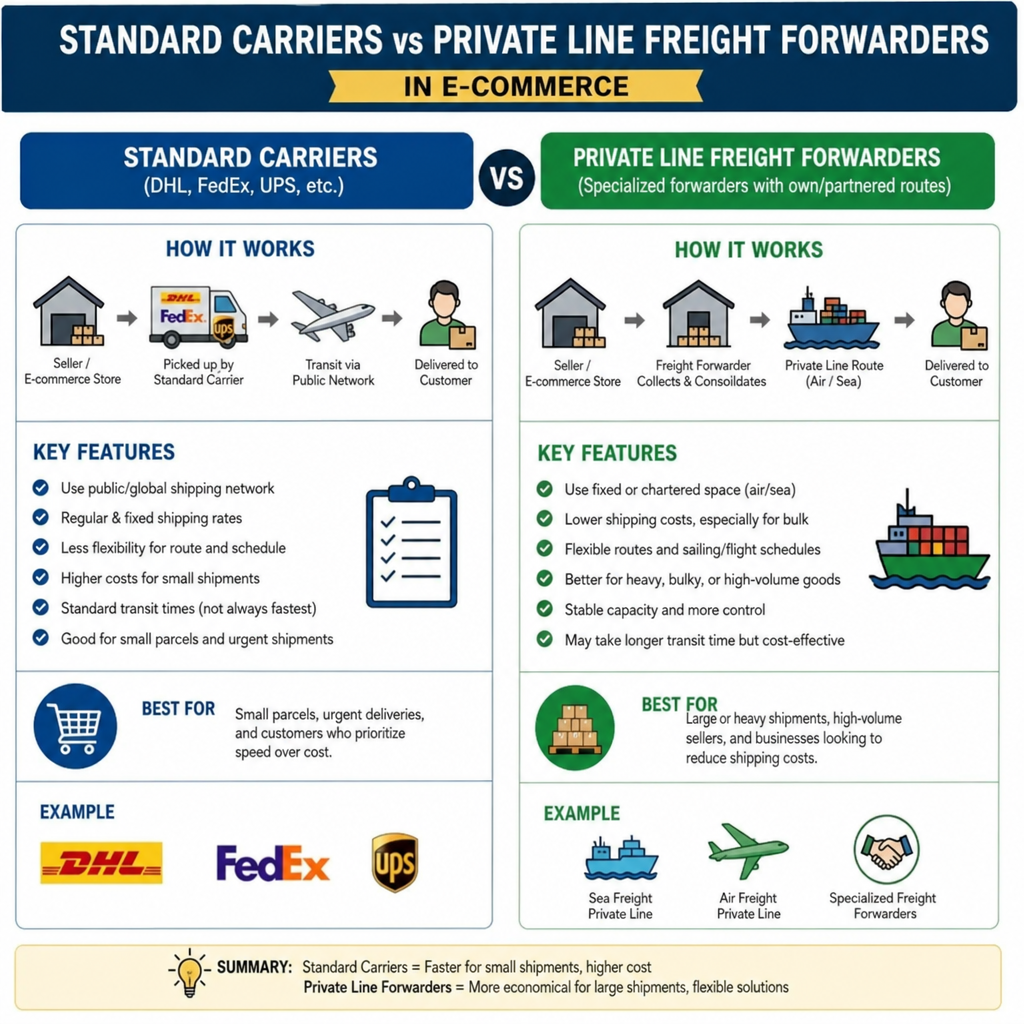
However, this transition introduces a new technical headache: how to handle custom tracking numbers in Shopify (private suppliers, freight forwarders, private lines).
When you use generic carriers like USPS, UPS, or FedEx, Shopify automatically recognizes the tracking format. But when your supplier ships via YunExpress, CNE, Yanwen, or a specialized private line, Shopify's default system often gets confused. If you do not configure this correctly, your customers will receive broken tracking links, leading to a flood of customer support tickets and chargebacks.
In this comprehensive guide, we will break down exactly how to handle custom tracking numbers shopify-style. From manual fulfillment tweaks and CSV bulk uploads to fully automating your workflow, you will learn how to keep your customers informed and your operations running smoothly.
When an order is fulfilled, Shopify sends an automated "Shipping Confirmation" email to your customer. This email contains a tracking number and a button that says "Track your order."
If your supplier uses a mainstream carrier, Shopify links that button to the carrier's official website. But when working with private agents, you might find yourself asking, "why is my shopify tracking link not working?"
This happens for a few reasons:
- Unrecognized Carriers: Shopify's default system only has native integrations with a specific list of global carriers. If your freight forwarder uses a specialized local line, Shopify defaults to "Other" but doesn't know where to send the customer.
- Missing Tracking URLs: If a tracking URL is not explicitly provided during fulfillment, the resulting email simply displays a plain text number. This results in a frustrating shopify tracking number not clickable issue for the buyer.
- Last-Mile vs. First-Mile Tracking: Many private agents use two tracking numbers—one for the flight from the origin country, and a last-mile tracking number (like USPS) once it clears customs. If you provide the USPS number too early, it will show "Pre-Shipment" for a week, causing buyers to panic.
Understanding the difference between a shopify custom fulfillment service vs shipping carrier is the first step in solving this. A custom fulfillment service manages the inventory and updates Shopify via API, whereas a standard shipping carrier is just the delivery mechanism. When using private suppliers, you are often acting as the bridge between their custom logistics and Shopify's carrier tracking.
Method 1: Shopify Manual Fulfillment Custom Carrier
If you are processing a low volume of orders, or if you just need to fix a handful of specialized shipments, you can handle custom carriers manually. Using a shopify manual fulfillment custom carrier allows you to bypass Shopify's default carrier list and inject your own tracking link.
Step-by-Step Manual Fulfillment:
- Navigate to your Shopify admin dashboard and go to Orders.
- Click on the unfulfilled order you want to process.
- Click the Fulfill item button.
- In the Tracking information section, enter the tracking number provided by your private supplier.
- In the Shipping carrier dropdown, scroll all the way to the bottom and select Other.
- A new field will appear labeled Tracking URL.
- Paste the exact tracking link where the customer can view their shipment.
By manually pasting the URL, you ensure that the button in the shipping confirmation email will direct the customer straight to the tracking page, effectively solving the "unclickable" link issue.
Method 2: How to Map Private Line Tracking to Shopify URLs
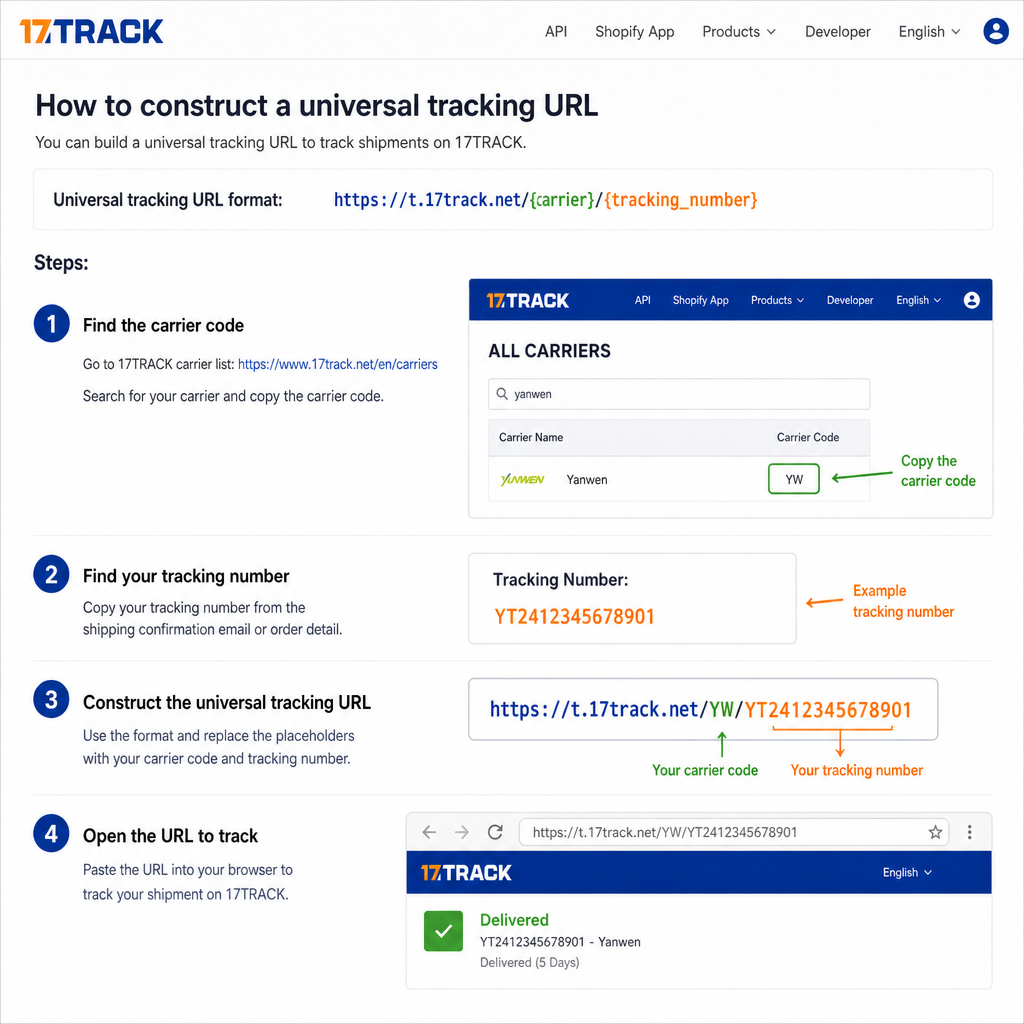
When you select "Other" as your carrier, you must provide a valid tracking link. But what if your supplier just gives you a spreadsheet of tracking numbers without URLs? You need to know the correct tracking URL format for private lines. The most reliable method is redirecting customers to third party tracking pages like 17TRACK, which acts as a global package tracking aggregator. 17TRACK can auto-detect almost any private line in the world.
Standardizing Your Tracking URLs
To map private line tracking to Shopify effectively, you can append the customer's tracking number to the end of a universal tracking URL. Here are the most common URL formats you can use:
- 17TRACK: https://t.17track.net/en#nums=YOUR_TRACKING_NUMBER
- ParcelsApp: https://parcelsapp.com/en/tracking/YOUR_TRACKING_NUMBER
- Cainiao (for AliExpress agents): https://global.cainiao.com/detail.htm?mailNoList=YOUR_TRACKING_NUMBER
Actionable Tip: If your tracking number is YT123456789, the URL you input into Shopify's "Tracking URL" field should be: https://t.17track.net/en#nums=YT123456789.
Method 3: Shopify Shipping Notification Template Customization
Even if you input the tracking URL correctly, Shopify's default email templates can sometimes strip the formatting or send customers to the default Shopify Order Status page, which might not support your private carrier's live map.
To fix this, you should look into adding tracking link to shopify shipping email notifications manually via the Liquid code. This ensures the tracking button works 100% of the time, regardless of the carrier.
How to Customize the Shipping Email:
- Go to Settings > Notifications in your Shopify admin.
- Under Orders, click on Shipping confirmation.
- Click Edit code (located in the top right).
- Locate the Liquid code for the tracking button. It usually looks like this: {{ fulfillment.tracking_url }}.
- You can modify the HTML to ensure it forces the third-party tracking link.
If you exclusively use a private freight forwarder and want all tracking numbers to route to 17TRACK automatically (ignoring Shopify's default carrier routing), you can use this shopify shipping notification template customization hack.
Find the tracking button code and replace the destination URL with:
https://t.17track.net/en#nums={{ fulfillment.tracking_number }}
By hardcoding this into your email template, you guarantee that every customer is sent to a functional tracking aggregator, permanently resolving any clickable link errors.
Method 4: How to Add Tracking Info to Shopify Orders via CSV
Manual fulfillment is fine for 10 orders a day, but what happens when you scale to 100 or 1,000 orders? Handling freight forwarder tracking in dropshipping at scale requires bulk actions.
If your private agent sends you a daily Excel sheet with tracking numbers, you can fulfill these orders in bulk without manually opening each order.
While Shopify doesn't natively support bulk fulfillment via CSV out of the box, you can easily achieve this using free or low-cost apps like MassFulfill or EZ Fulfill.
Formatting Your CSV for Bulk Upload
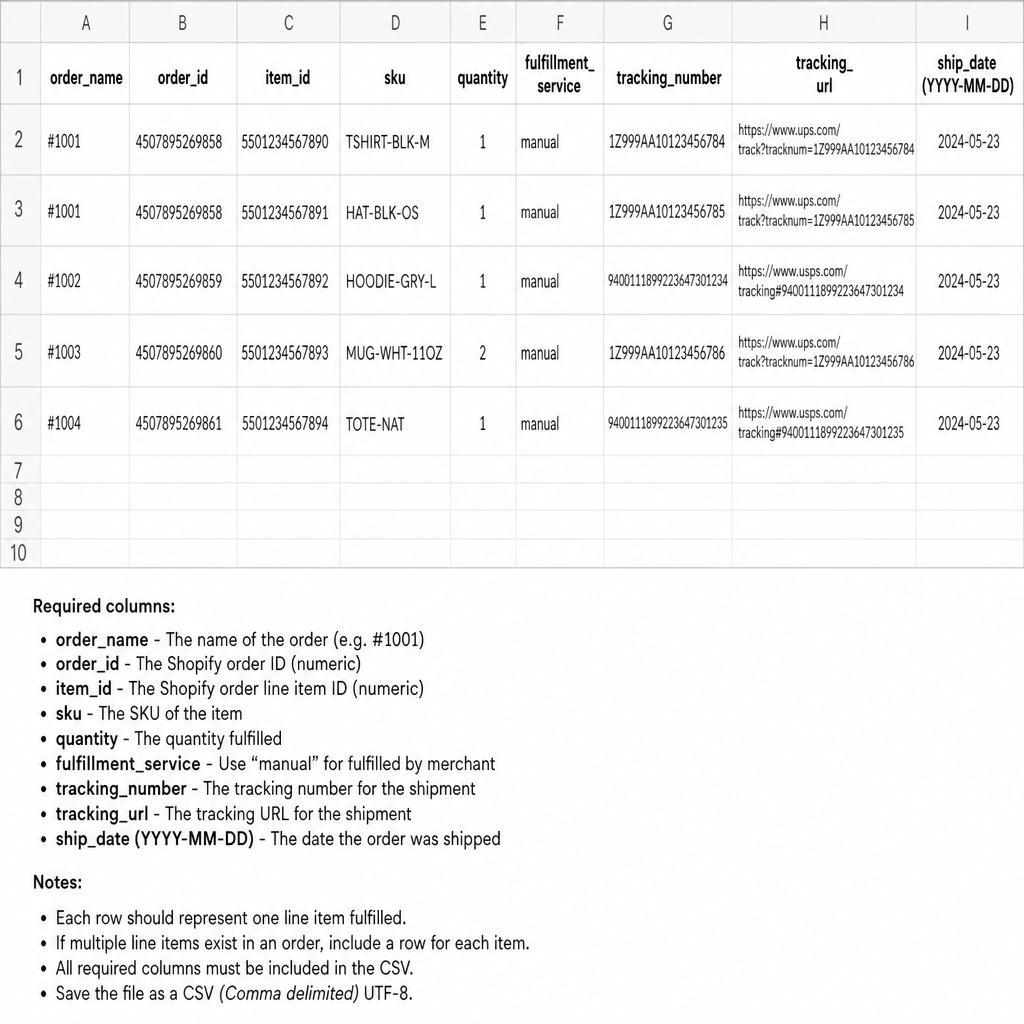
To learn how to add tracking info to shopify orders via csv, you need to format your supplier's spreadsheet correctly. Your CSV file generally needs these four columns:
- Order Name: (e.g., #1001)
- Tracking Number: (e.g., YT123456789)
- Tracking Company: (Type "Other" for private lines)
- Tracking URL: (e.g., https://t.17track.net/en#nums=YT123456789)
Pro Tip: Use Microsoft Excel or Google Sheets to automatically generate the Tracking URL column. If column B has your tracking numbers, you can use a simple formula in column D: =CONCATENATE("https://t.17track.net/en#nums=", B2) Once your CSV is formatted, upload it into your bulk fulfillment app. The app will communicate with Shopify's API, mark the orders as fulfilled, assign "Other" as the carrier, inject the tracking URL, and trigger the shipping confirmation emails automatically.
Method 5: Syncing Tracking Numbers from Private Agents to Shopify (Automation)
The ultimate goal for any growing e-commerce store is shopify private agent order fulfillment automation. You shouldn't have to touch CSV files or manual fulfillment buttons.
When you work with a professional private supplier or fulfillment center in China, they likely use an ERP (Enterprise Resource Planning) software like Dianxiaomi, Mabang, or a custom API.
Integrating Supplier ERPs with Shopify
Syncing tracking numbers from private agents to shopify can be completely hands-off. You can grant your agent restricted access to your Shopify store via a custom app or an existing dropshipping integration.
Here is how the automated workflow looks:
- A customer places an order on your Shopify store.
- The order is automatically pushed to your agent's ERP system.
- The agent packages the item, generates a tracking number via their private line (e.g., YunExpress), and prints the label.
- The agent's ERP sends an API call back to Shopify.
- The API marks the order as fulfilled, inputs the tracking number, and automatically maps the tracking URL.
If your agent does not have a sophisticated ERP, you can use bridge apps like DSers (if they list products via AliExpress hidden links) or AutoDS. Alternatively, you can give your agent a restricted "Staff Account" with access only to the Orders tab, allowing their team to fulfill orders using a dedicated app.
Method 6: Creating Universal Tracking Pages for Shopify Stores
Even if your shipping emails are perfectly optimized, modern customers expect to be able to track their orders directly on your website. Sending them to external sites like 17TRACK can sometimes look unprofessional or confusing, especially if the third-party site has ads or broken English translations.
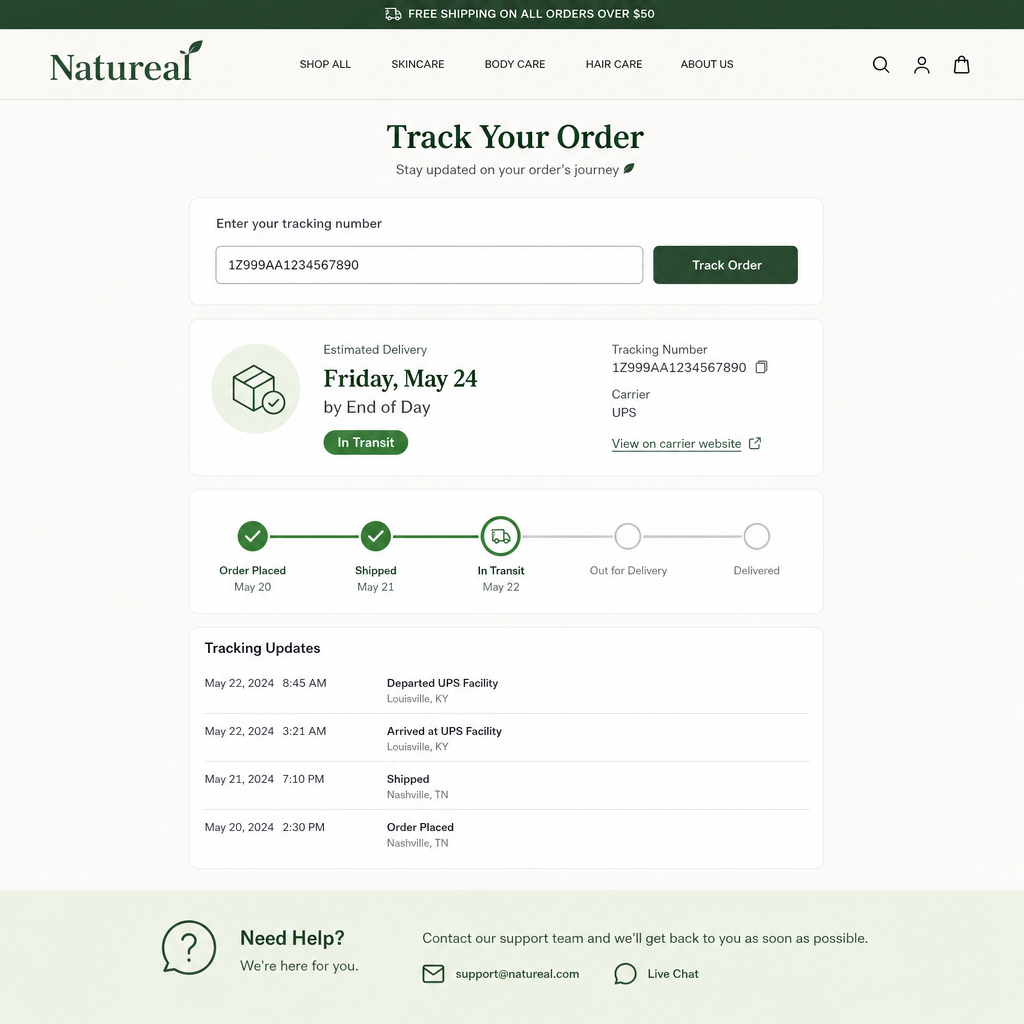
To elevate your brand, you should build universal tracking pages for shopify stores. This involves using a dedicated tracking app that integrates seamlessly with your store's theme, allowing customers to input their order number and email to see real-time updates.
Best Shopify Order Tracking Apps for Private Suppliers
When choosing an app, you need one that supports hundreds of global carriers, especially the obscure Chinese logistics companies used by freight forwarders. Here are the best shopify order tracking apps for private suppliers:
- ParcelPanel — arguably the best app for dropshippers and stores using private agents. It supports over 1,000 carriers globally. The best feature? It allows you to hide the origin country. If your freight forwarder ships from Shenzhen, China, ParcelPanel can hide all Chinese origin updates and only show updates once the package reaches the destination country, significantly reducing customer complaints about shipping origins.
- Track123 — highly customizable and excellent for handling freight forwarder tracking in dropshipping. It auto-detects the carrier based on the tracking number format and translates all foreign tracking updates into the customer's local language. It also creates a beautiful, branded tracking page right on your domain (e.g., yourstore.com/apps/track123).
- AfterShip — the gold standard for enterprise e-commerce. While it is slightly more expensive, its carrier API is incredibly robust. It integrates beautifully with Shopify and sends automated SMS or email updates when a package is "Out for Delivery" or "Delivered."
Setting Up Your Branded Tracking Page
Once you install one of these apps:
- Configure the app to recognize your private supplier's specific carriers.
- Set up translation rules (e.g., changing "Arrived at sorting center in Guangzhou" to "Package arrived at regional sorting facility").
- Add a link to your store's Main Navigation menu titled "Track Your Order".
- Update your Shopify shipping email to direct customers to your branded tracking page instead of an external website.
Handling Last-Mile Tracking Issues
One final hurdle when dealing with custom tracking numbers is the "first-mile vs. last-mile" discrepancy.
Many private lines partner with local postal services. For example, a package going to the US might be handled by Yanwen in China, but handed off to USPS for the final delivery. The tracking number you receive might be the USPS number.
If you fulfill the Shopify order immediately with the USPS number, the customer will check it and see "USPS Currently Awaiting Package" for 6 to 10 days while the item crosses the ocean. This causes massive anxiety for the buyer.
The Solution: Use your tracking app (like ParcelPanel) to map the private agent's tracking number. These apps are smart enough to pull the first-mile data from the Chinese carrier, and then seamlessly switch to the USPS API for the last-mile data, combining it into one unified tracking timeline for the customer.
Always communicate shipping expectations clearly on your product pages and shipping policies to mitigate these concerns before they become support tickets.
Conclusion
Transitioning to private logistics is a major milestone for your business, but it requires a strategic approach to customer communication. Figuring out how to handle custom tracking numbers in Shopify (private suppliers, freight forwarders, private lines) doesn't have to be a roadblock.
Whether you are using a shopify manual fulfillment custom carrier setup for smaller batches, updating via CSV spreadsheets, or leveraging full shopify private agent order fulfillment automation, the key is consistency. Ensure your tracking URLs are correctly formatted, customize your shipping notification templates, and consider investing in a universal tracking page app to keep your customers on your website.
By proactively managing how you handle custom tracking numbers shopify processes, you will drastically reduce customer support inquiries, build deeper trust with your buyers, and pave the way for sustainable, long-term e-commerce growth.
People Also Ask
- This usually happens when a supplier assigns a placeholder or batch tracking number before the item actually ships, or when using a 3PL that generates a master tracking number covering multiple orders.
- Apps like AfterShip or Shopify's native order tracking let you replace the default carrier tracking page with a branded one, reducing WISMO tickets by showing status without customers leaving your site.
- Be specific about what's known — confirm the order shipped, give the expected carrier update window (often 24-48 hours after pickup scan), and set a follow-up date rather than promising an exact delivery time you can't guarantee.
Related resources
Related service pages
Want to see how this would look for your brand?
We'll walk through your current support stack, ticket categories, and tooling — and show you what an operationalized version looks like inside Zendesk, Gorgias, or Help Scout.